Latest Blogs
Software Development
Ramsha Khan
Dec 11, 2025

Cloud-Based Disaster Recovery and The Cost Benefits of ...
When disaster strikes, people go into panic. We cannot afford to panic in a cloud-based environment, if we panic, we risk losing all data with our reputations sinking in the ocean.
Instead of panicking over data loss, we need a solid disaster recovery strategy beforehand because when data loss occurs, it accompanies severe consequences like operational disruptions and business closures.
Here, cloud-based disaster recovery plans come in like a life-saving grace.
In a cloud environment, disaster recovery employs cloud computing to keep all data and applications safe against any potential disasters. It involves maintaining and storing electronic records in a cloud infrastructure, ensuring that all data is backed up in case of data loss.
A specialized form of cloud-based disaster recovery is the DRaaS, or disaster recovery as a service, which is a service companies use to outsource the hosting and replication of servers to third-party providers.
So, instead of an in-house recovery plan, they get the backup outsourced, enabling them to continue business no matter the calamity. These third-party facilitators assist in data recovery and rapid business continuity.

Cloud-based disaster recovery offers several benefits compared to traditional methods, such as being more cost-efficient, scalable, flexible, and providing faster recovery times.
Cloud solutions follow a pay-as-you-go approach, removing the need for large upfront investments in physical hardware.
These solutions allow businesses to easily adjust storage and computing resources according to their requirements, supporting business expansion and preventing over-provisioning expenses.
Cloud-based disaster recovery minimizes Recovery Time Objective (RTO) and Recovery Point Objective (RPO), ensuring quicker data recovery from the cloud.

It is imperative that you choose a reliable and trustworthy DRaaS provider as it concerns your million-dollar business. There are factors from infrastructure, compliance, and security to customer service and pricing that you should consider.
However, the most important features to note are the SLAs. They define the provider’s obligations concerning performance and availability, providing transparency and a course of action if issues arise.
Get in touch with the developers at Arpatech and let’s back up your data to the cloud!
Saima Naz
Feb 21, 2024

Cloud Computing Security Best Practices and Strategies ...
Cloud computing security and cybersecurity go hand in hand. When it comes to cloud security, it can entail a lot of things, including, protecting all data and information from falling into malicious hands, mitigating threats before they can harm your business, and being ready for any threat or incident.
But cloud security is more than just being ready to defend against every threat. The best approaches vary on the cloud computing model you choose for your business because navigating hybrid cloud and multi-cloud requires customized strategies if you want to stay ahead of the curve.
With the vast amount of data stored in the cloud today, it is paramount that you implement cloud security. It protects all kinds of confidential information and restricts all unauthorized access.
By adopting effective security measures, both individuals and businesses can have confidence that their data is safeguarded from cyber-attacks and other risks. Additionally, robust cloud security ensures adherence to industry standards and regulations, promoting trust with customers and partners.
Prioritizing cloud security is essential for protecting sensitive personal and business information, making it a crucial consideration.

When organizations move from on-premises systems to cloud infrastructure, understanding how to ensure a smooth transition is essential. Below are key cloud computing security best practices and strategies that businesses should adopt during the shift to cloud infrastructure.
First of all, it is vital that a business understands its cloud usage requirements by assessing all sensitive data and identifying all potholes that are potential risks for the company. Start the process of recognizing your cloud requirements by taking audit configurations of IaaS service providers such as AWS and Azure to verify aspects like encryption and network configuration.
Cloud security is not the sole responsibility of the cloud provider, they work on a shared responsibility. It is imperative that businesses do their part like ensuring that all applications and infrastructures are secure. The shared roles change according to the cloud module you choose from IaaS, SaaS, or PaaS.

APIs offer users access to cloud computing services, making it crucial to secure them due to their potential vulnerabilities to security breaches. Businesses can enhance API security by employing API gateways, monitoring API activities, updating dependencies, and identifying weaknesses. Additionally, implementing encryption for APIs can help reduce the risk of unauthorized access.
Lastly, it is important that when you’re transitioning your business to the cloud infrastructure, you ensure that the cloud providers you select follow all regulatory compliances such as PCI DSS and HIPAA. This will help ensure adherence to standard regulatory requirements and prevent legal repercussions.
As more businesses are moving towards the cloud computing infrastructure, a study by Gartner predicts that more than 50% of companies will be using cloud platforms by the end of 2028, predicting the importance of the cloud.
Do you want to utilize the cloud in your business and enhance security around all operational aspects? Arpatech offers managed cloud services and consulting. Book your session with our professionals today!
Saima Naz
Feb 16, 2024

Cloud Migration Guide: Step-by-Step Process to Seamless...
The cloud revolution has arrived, and organizations across the globe are recognizing its potential. From scalability and agility to cost efficiency and improved performance, the cloud offers several benefits. However, migrating your current workloads from on-premise data centers to the cloud is nothing less than a challenge.
If you’re shifting towards the cloud, explore here how you can acquire a seamless and successful cloud migration journey!
Before we learn the steps, you need to take, let’s remember why cloud migration is beneficial to your business. The cloud offers agility, scalability, cost optimization, disaster recovery and improved security to your business and promotes an innovative and collaborative environment throughout your organization.

Now, let’s delve into the 7 essential steps for a seamless cloud migration:
Begin by understanding your aims and objectives. What business goals do you want to achieve? Identify specific applications, workloads, and data that need to be migrated. You also need to consider compliance requirements and security needs.
Several cloud migration strategies exist, each with its advantages and drawbacks. Here are two of the most popular ones:
Move workloads directly to the cloud without major changes. Suitable for simple applications.
Modernize applications to leverage cloud-native features and functionalities for improved performance and scalability.
Your plan should outline the scope, timeline, resources, and budget for the migration. It should also include detailed migration steps for each workload, data migration strategy, and testing procedures.

Evaluate various cloud providers based on your needs and budget. Consider factors like service offerings, security, scalability, pricing models, and support. Choose the provider that best aligns with your requirements.
This stage involves the actual migration of workloads to the cloud. Ensure proper communication and collaboration among your IT team, the cloud provider, and any other stakeholders. Conduct thorough testing and validation throughout the process.
Cloud migration is not a one-time event. Continuously monitor and optimize your cloud resources to ensure cost efficiency and optimal performance. Implement governance policies and security measures to ensure ongoing security and compliance.
Before migrating your on-premise applications to the cloud, don’t rush in! Start by thoroughly checking how your applications interact with each other and whether they’re compatible with the cloud environment you’ve chosen.
In some cases, it might be worth modernizing your applications to take advantage of the cloud’s capabilities and improve performance.

Finally, break down the migration process into smaller phases to minimize disruptions to your operations and ensure a smooth transition. Don’t try to move everything at once, contact experts in the field to handle it if you’re still unsure.
Saima Naz
Feb 12, 2024
Top Cloud Services – Comparing IaaS, PaaS, and SaaS f...
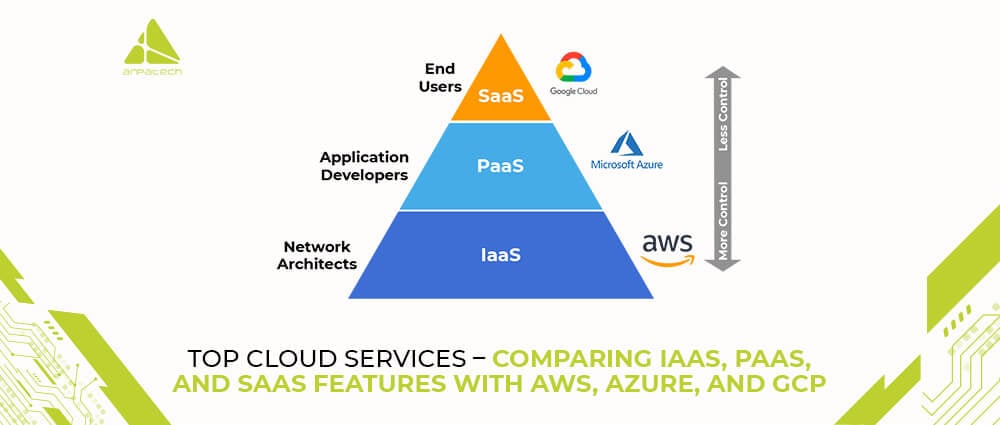
Gone are the days when the sky was the limit—today, it’s the cloud! Organizations are swiftly migrating to cloud services , leveraging the flexibility, scalability, and cost-effectiveness they offer. However, navigating the cloud universe is not easy, especially with terms like IaaS, PaaS, and SaaS hovering around. But you need not fret! Here we incisively explore these cloud service models, comparing the offerings of these three key players: AWS, Azure, and GCP.
Before we delve into the big three, let’s understand the fundamental cloud service models:
Rent the building blocks: virtual servers, storage, and networking. These allow you to build your own IT infrastructure on top. Think of it as a customizable lego set for your digital needs.
Focus on developing and deploying applications without worrying about the underlying infrastructure. Imagine a pre-built platform with tools and services waiting to bring your app ideas to life.
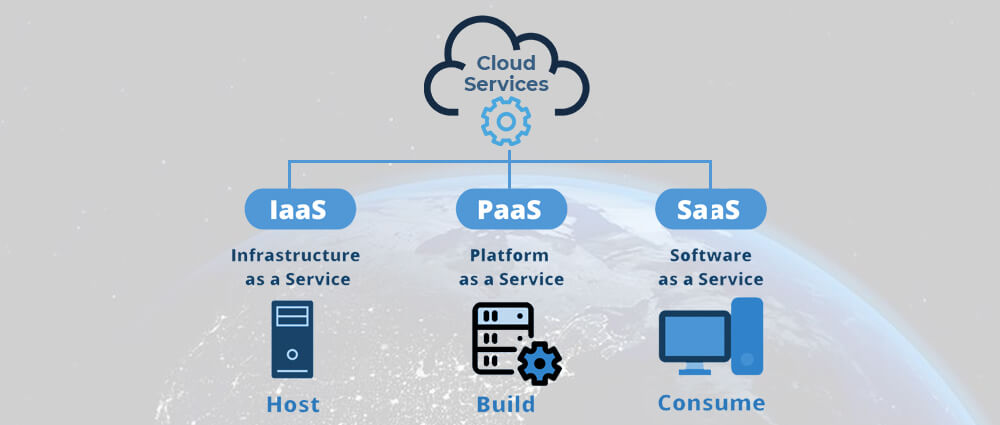
Subscribe to and use ready-to-go software applications over the Internet. Think of it as renting software instead of buying it, with the provider handling maintenance and updates.
Now, let’s see how these models translate into the offerings of the industry giants:
Amazon Elastic Compute Cloud (EC2) offers virtual servers with diverse configurations, while Amazon Simple Storage Service (S3) provides scalable object storage.
AWS Elastic Beanstalk simplifies application deployment and management, and AWS Lambda offers serverless computing for code execution without managing servers.
From Amazon WorkMail for email to Amazon SageMaker for machine learning, AWS offers a plethora of SaaS solutions.
Azure Virtual Machines provide customizable virtual servers, while Azure Blob Storage offers flexible object storage with various tiers.
Azure App Service simplifies web app and mobile backend deployment, while Azure Functions offers serverless computing capabilities.
Microsoft Office 365, Dynamics 365, and Azure Active Directory are just a few examples of Azure’s extensive SaaS solutions.
Google Compute Engine offers virtual machines with diverse configurations, while Cloud Storage provides flexible object storage with various options.
Google App Engine manages app deployment and scaling, while Cloud Functions offers serverless computing capabilities.
Google Workspace for collaboration, Cloud Spanner for globally distributed databases, and BigQuery for data analytics are some of GCP’s SaaS offerings.
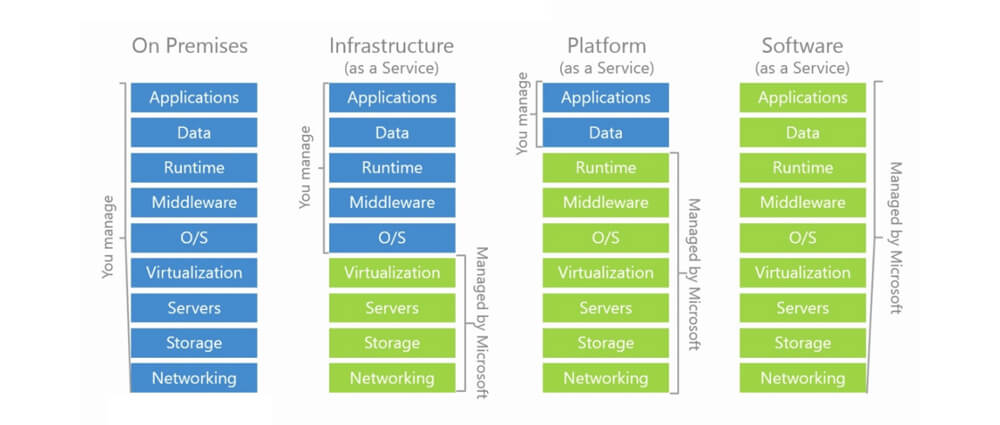
The choice between IaaS and PaaS depends on your specific needs:
Choose IaaS if you need fine-grained control over your IT infrastructure, have unique security requirements, or require specific operating systems. It’s ideal for large enterprises with complex IT needs.
Choose PaaS if you want faster development and deployment, value ease of use, and prioritize agility. It’s perfect for startups or businesses focusing on core application development.
SaaS shines when you need specific software functionality without managing the infrastructure or software itself. It’s ideal for businesses of all sizes seeking cost-effective, readily available solutions.

The cloud is not a one-size-fits-all solution. By understanding your individual needs and carefully evaluating the offerings of different providers, you can choose the cloud services that will drive your business to new heights. So, get ready to explore the vast potential of the cloud and embark on your journey to growth and innovation!
Saima Naz
Feb 7, 2024

Cloud Benefits for Business – Why Cloud Is Good for R...
The cloud revolution has arrived, and organizations across the globe are recognizing its potential. From scalability and agility to cost efficiency and improved performance, the cloud offers several benefits. However, migrating your current workloads from on-premise data centers to the cloud is nothing less than a challenge.
If you’re shifting towards the cloud, explore here how you can acquire a seamless and successful cloud migration journey!
Before we learn the steps, you need to take, let’s remember why cloud migration is beneficial to your business. The cloud offers agility, scalability, cost optimization, disaster recovery and improved security to your business and promotes an innovative and collaborative environment throughout your organization.
Now, let’s delve into the 7 essential steps for a seamless cloud migration:
Begin by understanding your aims and objectives. What business goals do you want to achieve? Identify specific applications, workloads, and data that need to be migrated. You also need to consider compliance requirements and security needs.
Several cloud migration strategies exist, each with its advantages and drawbacks. Here are two of the most popular ones:
Move workloads directly to the cloud without major changes. Suitable for simple applications.
Modernize applications to leverage cloud-native features and functionalities for improved performance and scalability.
Your plan should outline the scope, timeline, resources, and budget for the migration. It should also include detailed migration steps for each workload, data migration strategy, and testing procedures.
Evaluate various cloud providers based on your needs and budget. Consider factors like service offerings, security, scalability, pricing models, and support. Choose the provider that best aligns with your requirements.
This stage involves the actual migration of workloads to the cloud. Ensure proper communication and collaboration among your IT team, the cloud provider, and any other stakeholders. Conduct thorough testing and validation throughout the process.
Cloud migration is not a one-time event. Continuously monitor and optimize your cloud resources to ensure cost efficiency and optimal performance. Implement governance policies and security measures to ensure ongoing security and compliance.
Before migrating your on-premise applications to the cloud, don’t rush in! Start by thoroughly checking how your applications interact with each other and whether they’re compatible with the cloud environment you’ve chosen.
In some cases, it might be worth modernizing your applications to take advantage of the cloud’s capabilities and improve performance.
Finally, break down the migration process into smaller phases to minimize disruptions to your operations and ensure a smooth transition. Don’t try to move everything at once, contact experts in the field to handle it if you’re still unsure.
Saima Naz
Feb 1, 2024

Mapping the Typical Stages of a Consumer Journey in E-C...
Like other types of businesses, the world of e-commerce is also undergoing massive changes, making it crucial to adopt methods to stay ahead of the competition. A very critical component of this change is to understand the e-commerce customer journey, as organizations have come to terms with the significance of attracting and then retaining customers.
Organizations are always on the lookout for ways to improve the customer experience and drive long-term success. To do so effectively, businesses need to take a robust strategy across the entire customer lifecycle, from discovery to post-purchase interaction. This blog post will delve into some crucial stages of a consumer journey in e-commerce.
Imagine a vast ocean, your brand a lone island waiting to be exposed. This is the awareness stage, where potential customers first encounter your brand. It’s sparked by various lighthouses:

Once your island is spotted, curious pirates (potential customers) sail closer to investigate. This is the consideration stage, where they:
Through research and consideration, some pirates decide to anchor at your island. This is the decision stage, where:

With a clear destination in mind, the pirates set sail for your checkout. This is the purchase stage, where:
Happy pirates become loyal customers, returning for more treasures. This is the retention and advocacy stage, where:
It’s worth noting that e-commerce journey isn’t linear. Customers might revisit stages, skip some altogether, or even set sail for other islands. However, by understanding these typical stages and optimizing touchpoints along the way, a map can be created that leads them to satisfaction, loyalty, and brand advocacy.

By following these tips and understanding the e-commerce journey, you can transform your website into a hospitable harbor, attracting new customers, retaining loyal ones, and ultimately, charting a course towards e-commerce success.
Saima Naz
Jan 13, 2024

How to Choose the Right Mobile Platform for Your Mobile...
How to choose a quality mobile web development company? That’s the question that keeps many quality-conscious individuals and businesses concerned. The reason? businesses are swiftly turning to mobile app development to reach a wider audience, improve customer engagement, and boost their brand presence.
However, given a proliferation of mobile application development platforms in the last few years, choosing the right company for your app might be a challenging undertaking. This blog post will explore the factors to consider when selecting the right mobile platform for your app, ensuring you make an informed decision that is consistent with your business goals and target audience.
Mobile app platforms provide the tools and frameworks necessary to create and deploy mobile apps. These platforms can be broadly categorized into three main types:

Numerous factors influence the choice of mobile platform for your app. Here are some key considerations:

How to Choose a Mobile App Development Company
Once you’ve selected the right mobile platform, the next step is to choose a reputable mobile app development company. Consider the following factors when making your decision:
Android and iOS are two major players in the smartphone market. In terms of the market share, Android outdoes iOS, as the former has a larger number of people using an Android phone. A Statista report reveals that about 71.1% of people use an Android phone, while around 19% of the world’s population use the iOS operating system.

According to recent studies, people in high-income countries including the United States, Japan, Singapore, and Canada use Apple phones, while in poor or developing countries, the use of Android phones is more prevalent. Software engineers often find themselves confused when it comes to choosing between Android and iOS app development. Not only are the two systems poles apart on the development level but also in terms of design and marketing strategy.
There are hundreds of platforms for mobile app development, but choosing the right mobile platform and development partner is key to the success of your mobile app. By carefully evaluating your target audience, app requirements, budget, and future goals, you can make an informed decision that aligns with your business objectives. Remember, the right platform and development team will transform your app idea into a reality, empowering your business to reach new heights of success.
Saima Naz
Nov 28, 2023

Top DevOps Monitoring Tools to Streamline Operations
The conventional methods of software development struggle to keep up with the demand for top-notch software applications. Unlike the traditional approach where the development and operations teams operate separately, DevOps is a more effective method. It eliminates these isolated working environments and encourages continuous communication and cooperation between these teams throughout the entire software development process. With DevOps monitoring tools, this shift mitigates problems such as delays, errors, and misunderstandings, ultimately leading to more efficient and high-quality software delivery.
DevOps monitoring is the practice of keeping tabs on how software applications are operating. From planning and development to deployment and user experience, we monitor every stage of the software cycle.
With a separate monitoring team assisting the development team, they find and fix problems before the software is deployed, enabling top-tier user experience.
DevOps monitoring tools are software solutions designed to help DevOps teams track, manage, and optimize various aspects of the software development. These tools play a significant role in ensuring the reliability, performance, and security of applications. These monitoring tools in DevOps offer a wide range of capabilities.
Top DevOps monitoring tools help teams respond swiftly and automatically when anything goes wrong for users. Some of the most popular tools are:
Sensu is an open-source project used for keeping an eye on servers, services, applications, and parts of your computer setup. Another version of Sensu, called “Sensu earlier in the development process, which means fewer problems reaching the final product. Whether it is fixing problems manually or by using automated tools, better software tracking and measurement make it possible by Sumo Logic, it is a lightweight, open-source software that can monitor, analyze, and send alerts about data from any source.
Sensu is like a detective tool for organizations. It helps them find and solve problems before those problems can damage the business. Sensu gives you a complete view of how well your computer system works by running various checks such as HTTP checks, TCP checks, examining logs, and keeping an eye on processes. All this helps create an accurate picture of your computer setup.
Prometheus is a DevOps monitoring tool that is used to keep an eye on and study an organization’s computer system. It’s a system for monitoring and storing data over time, particularly when there’s a lot of data coming in very quickly. It’s made to handle the needs of big, modern computer setups.
Prometheus includes ready-made parts for saving its data, sending out alerts when certain conditions happen, showing the data as graphs in real time, and asking questions about the information it collects. It can also keep records of past events for a long time without losing any details.

PagerDuty is a platform designed specifically to offer various capabilities such as monitoring alerts, scheduling on-call shifts, creating escalation plans, and closely watching for incidents that could disrupt their applications.
Using PagerDuty, operations teams get timely alerts. These alerts help them swiftly identify, assess, and fix issues, whether they occur during the development phase or in the production environment. PagerDuty’s incident response and alerting services are efficient and easy to use, making it a valuable tool for teams managing operations.
Zabbix is a free and open-source DevOps monitoring tool that is used to monitor and handle a computer network. It has tools that help gather information in a network, like servers, workstations, and virtual machines. It can do this with or without having special programs on those computers.
To monitor big networks, Zabbix can use “proxies.” These proxies watch over the computers in those places and send information back to the main server or another proxy.
All the data collected by these watchers can be stored in almost any kind of database that understands SQL, like Oracle or MySQL.
Librato is a cloud-based DevOps monitoring tool that helps businesses keep track of important metrics across their entire system. It offers all the necessary features for visualizing, analyzing, and getting alerts about these metrics.
Librato comes with a comprehensive range of solutions for monitoring and analyzing data. It provides a variety of services that help you understand the monitored data and offers excellent visualizations. Moreover, its user interface is easy to navigate and user-friendly. You can trust the alerts it sends, allowing you to take appropriate actions based on your production environment’s current situation.
For Enhancing DevOps with effective monitoring practices, you can utilize these diverse range of top DevOps monitoring tools available. These tools cover a lot of different ways organizations work. Whether you need a full-featured platform or a specialized tool, you can find a DevOps monitoring tool that fits your needs and streamlines your business operations.
If you need more clarity on the subject, don’t hesitate to reach out to Arpatech’s developers for a free consultation!
Saima Naz
Sep 22, 2023


Before we begin, please solve this quick math check to confirm you're human, and you'll be all set to start chatting with our AI assistant.
Stay connected with us to receive the latest information, updates, and insights from our world of innovation.
By entering your email address you will receive promotional updates.


© 2025 ARPATECH (ADVANCED RESEARCH PROJECTS & TECHNOLOGY)