Blog Directory

Secure Data Management Within and Across Data Centers

Secure Data Management Within and Across Data Centers

Over the past few decades, cloud computing and modern technology have led to the revolutionization of how we collect data, process it, and store it. Small and large business enterprises are moving their infrastructure to the cloud in recent years, because of two main reasons: massive storage capacity and accessibility. Encrypting the data keeps it secure – and therefore, managing secure data is something you need to be familiar with.


Although there have been improvements in maintaining data security in recent years, it’s still far from satisfactory. Data centers keep valuable and sensitive information, which is why they need to implement firm security protocols, both virtually and physically. Once data centers can implement a good architecture to protect their data, they can be safe and implement their security policies. You need to consider different parameters before selecting which data centers are right for your needs. In this piece, we will address what data center security should entail and how you can make sure your data remain safe on the cloud.


What is data center security?

By definition, a data center is a facility where organizations can store large amounts of data. These facilities have a robust IT infrastructure, designed to ensure the safety of data at different points. Organizations storing data at these data centers can organize, process, and store their data, and recover, backup, and do more with the data no matter where they are, and at any time. Data centers store critical data, which is why they have to ensure security at a high level to protect their users.


Factors that Govern the Effectiveness of Data Centers


There are three things that matter:

  • Physical security
  • Restricted and managing access
  • Setting up tested security protocols and measures


Each of these components comprises different elements, which ensure the effectiveness of one another. All of these can ensure maximum security, surveillance, and access to locations remotely, and ensure multiple authentication protocols. Together they ensure a high level of security and compliance with security policies. Before selecting a data center, make sure you look into how they ensure security and whether they implement best practices to protect data.


5 Best Practices That Ensure Data Center Security


Having addressed the basics of data center security, now let us address five best practices that you can look out for to ensure maximum virtual and physical security. It is not possible to list all the best practices, so we have selected the top 5, which are as follows:


Appropriate Physical Data Center Security

For proper physical data security, one must look out for certain factors. The main concern one must have is the facility architecture. The offices must be independent, to keep limited access and protect the data. The windows and walls must be bulletproof, there must be few windows, and personnel should guard each corner of the building against threats. The environment generally must be secure.

Monitor and Restrict Access

One major threat to avoid is human error. Data centers must ensure that the personnel who have access to the data are trained and do not have access to key assets without proper authorization. Unauthorized personnel should not be able to enter or access the restricted rooms, nor gain control of any server. There must be layers of security protocols that can be both digital and physical, such as the use of biometrics, retinal scans, etc.

Efficient Network Security

Network security is more of a virtual protocol. It involves using technology and different tools to ensure the security of data. Networks must have proper firewalls setup, there must be intrusion detection systems, and ways to monitor and inspect the traffic. This is necessary to keep hackers out. Most data centers also use ACLs (Access Control Lists) to make their defenses robust and impenetrable.

Data Protection (Encryption and Monitoring)

It is not possible to separate data security from data center security. To ensure protecting one or both, it is necessary to encrypt the data, especially during transfer. It is also important to monitor the data all the time and maintain regular backups. The use of strong passwords is also highly recommended.

Latest Technologically Advanced Infrastructure

It is necessary to ensure the data center uses the latest technology and there is no redundant infrastructure. Redundancy means leaving data sensitive or liable to threats like hackers. There must also be minimal downtime to prevent risks of losing firewalls and protective measures. Using the latest technology can also ensure there are fewer human errors.

Conclusively, the right data center would ensure implementing all the best practices and infrastructure to manage and protect data across the entire facility.


Saima Naz

Sep 1, 2020

Data Staging Issues in Cloud Computing

Data Staging Issues in Cloud Computing

In recent days, the usage and sale of digital devices such as smartphones, tablets, laptops, etc., have increased exponentially. These devices connect to other mobile devices allowing users to share and access data and applications on the go, anywhere, and at any time. The traditional infrastructure is a thing of the past now. Managing data has become costly and is not as easy as it once was. The rapid growth in internet usage worldwide has led to cloud computing, which offers a means of managing data of any size and variety.


Cloud computing introduces ways of providing new resources through the internet based on hardware ownership and storage location. Now, users of cloud computing do not own its infrastructure, rather the service providers own it. This gives rise to some privacy and security concerns by users.


The Cloud computing domain is very broad. It is almost impossible to address all its components in this article. However, since we are mainly interested in the data staging issues in cloud computing, we will focus on them alone. It is important to mention that as organizations and individuals store more-and-more information on cloud storage, more security breaches and privacy problems are arising. Storing sensitive data on the cloud is not always advisable.


Classifying Data Security Issues

The most common and important concern when it comes to data security is the technology uses for its storage. In an uncontrolled environment such as Cloud Computing, ensuring acquiring the right technology for data security has become very challenging. One needs to distinguish and identify the security risks associated with IT infrastructure and the risks caused by using cloud computing.

classifying-data-security-issues

Generally, the risks associated are open, shared, and distributed environments.

To analyze the associated risks, we must separate the existing problems and those raised due to cloud computing.


When one outsources data to cloud infrastructure, it becomes more vulnerable than data stored on a traditional infrastructure (local server). There are three reasons for this:

  1. The data is on the provider’s infrastructure
  2. There are different users’ data also stored on the same physical infrastructure
  3. The data is easy to access via the internet


This classification is based on three aspects of cloud computing:

  1.  – Single cloud characteristics
  2.  – Cloud data life cycle
  3.  – Data security attributes.

Data Issues Based on Cloud Characteristics

There is no doubt that the cloud infrastructure is different from traditional infrastructure. There are some benefits that come with these differences, just as there are inconveniences coming along with it. Below are some of the benefits and inconveniences based on the main characteristics of cloud computing:

Leased Infrastructure

leased-infrastructure

In this case, the cloud infrastructure does not belong to the user. It belongs to the service provider. Users are not purchasing the hardware dedicated to their data storage, but as leasing it from the provider. The advantage of this infrastructure is that users get storage at an affordable cost. The main inconvenience here is that the users lose control of their data when there is a breach in security.

Open Infrastructure

open-infrastructure

Access to this infrastructure is via the internet. The main advantage of this is ubiquitous access to services. The main inconvenience is that there are multiple entry portals.

Shared infrastructure

shared-infrastructure

This is a shared cloud infrastructure that is unlike the traditional infrastructure.

Elastic Infrastructure

elastic-infrastructure

The users of this cloud can scale the resources up or down based on their needs. In other words, this infrastructure varies with the user’s demand. This form of cloud computing scales to the demand. The main advantage of this form of infrastructure is resource optimization. The con is risk associated with resource reallocation.

Virtualized Infrastructure

virtualized-infrastructure

This is the basic concept supporting cloud computing. It is more of a virtual machine rather than a physical one. The pros of this are optimized infrastructure, and the con is that it is associated with classical problems of virtualization.

Distributed Infrastructure

distributed-infrastructure

The distribution of this infrastructure is based on global geography. The pros are increased storage capacity and computing, while the cons are maintenance and management of the infrastructure.

Some other risks to data due to these infrastructures include:

  • Data-in-transit
  • Data-in-use
  • Confidentiality
  • Integrity
  • Availability

The Solution to Data Issues and Risks

the-solution-to-data-issues-and-risks


The best way to elude these issues is by protecting the stored and transmitted data by encrypting it. Data security solutions depend on parameters like data type and data size.

Saima Naz

Aug 31, 2020

Comparing AZURE vs AWS

Comparing AZURE vs AWS

Some of the most popular names in public cloud services are Amazon Web Services (AWS) and Microsoft Azure. So, which one for you is right? Let’s talk about what each provider brings to the cloud table and the key differences between them to help you take the decision.


Integration

AWS: Amazon has become better linked with the open source community, so that more open source integrations such as Jenkins and GitHub are available through this platform. Linux servers are also friendlier.

AZURE: Azure provides native support for such applications if you use Windows developer software such as VBS, SQL server, and Active Directory. For example, you need to currently log in Office 365 or Azure SQL instances with the same AD accounts. For .net apps, Azure is fantastic too. Microsoft hasn’t always followed the paradigm with respect to open source, but Azure catches up – now companies can run Red Hat Enterprise Linux and Apache Hadoop clusters in Azure.


Computing Power

AWS: Users choose size, power, memory capacity and number of video machines and select from various regions and areas for the launch.

AZURE: Azure users choose the machine-equivalent Virtual Hard Disk (VHD) to build a VM. Microsoft, the consumer or a third party may pre-configure VHD. The number of cores and the memory should be specified by the user.


Storage

AWS: AWS is provided with temporary storage when an instance is started and removed once it’s is complete. You can have block storage, which can be separate or attached to a case, just as hard disks. S3 provides database storage, and Glacier data archiving facilities. This supports relational, NoSQL, and big data databases.

AZURE: Azure provides temporary D drive storage, Page Blobs for file storage of VMs. Block Blobs and files are also used to store objects. Azure supports relational databases; Azure Table and Azure HDInsight NoSQL and the big data. It also provides recovery platform, import export and azure backup for further archiving and recovery.


Network

AWS: Virtual Private Cloud (VPC) is supported by Amazon so that users can build independent networks in the cloud. A user can build sub-networks, tables of path, private IP addresses and network gates in the VPC.

AZURE: Microsoft provides Virtual Network (VNET), which allows users to build remote and sub-networks, route tables, specific IP address ranges and network gateway. Both companies offer solutions to extend the cloud and firewall option to the on-site data center.


Orchestration and containers

AWS: Amazon is continuously investing in satisfying requests for new services, which results in more mature analytical services. (ex AWS Elastic Map Reduction Hadoop Support). They have added tools and features for machine learning for IoT and allow customers to build mobile apps or create high- performance computer environments according to their specific needs. It also gives Docker support.

AZURE: Microsoft also has a good record of meeting new demand, and offers support from Hadoop to Azure HDInsight. The 2016 Windows Server includes Docker functionality for Windows and Hyper-V containers alike. The platform is able to run Windows or Linux containers which makes Amazon a great competitor.


User Friendly

AWS: More functionality and configurations are available from Amazon, if you want to know the system. AWS provides lots of support and benefits IT sector, versatility and configuration, and allows many integrations from third parties. Yet AWS has a curve of learning.

AZURE: Azure would be easier to use out of the box if you are a Windows admin because it is a Windows platform that needs nothing new to understand. Windows servers with cloud instances can be integrated easily on the screen to create a hybrid environment. Azure works well with software such as SQL and Active Directory.


Conclusion

AWS and Azure have several similar features, such that one cloud service doesn’t automatically have to be “better” or “better” than the other. All depends on what the business wants. Whatever service you decide to contact, you can benefit from an over-the-top cloud solution to meet your business needs.


Saima Naz

Jul 27, 2020

Deployment of Azure IoT Edge modules from the Azure Portal

Deployment of Azure IoT Edge modules from the Azure Por...

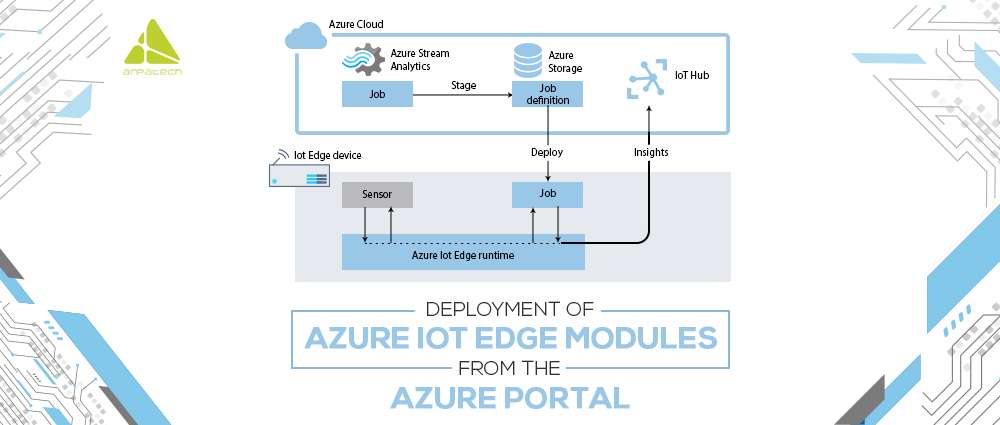
Deployment of Azure IoT Edge modules from the Azure portal is perfect for your business. If you have more than one module that is working together to collect data, it is important to declare the routing rules which connect them. It is no hard to build an automated IoT Edge deployment in the Azure portal to handle ongoing deployments for multiple devices simultaneously. Automatic IoT Edge deployments are a part of IoT Hub’s automated system management functionality. Deployments are dynamic processes that allow you to deploy different modules to different devices, monitor the module’s status and safety, and adjust accordingly.


Here is a process of how to deploy Azure IoT Edge modules:

  1. First, you have to Sign-in to the Azure portal and try to navigate to your IoT hub in a correct manner
  2. On the left side of the portal is a menu button, select IoT Edge from the menu.
  3. Then click on the ID of the device that you choose from the list of devices present there.
  4. Then select Set Modules on the upper bar.
  5. Then move on to the Container Registry.
  6. After you select the AzureIoT Edge Modules section of the page, select Add.
  7. Here are a few types of modules which comes from the drop-down menu:
    • IoT Edge Module
    • Marketplace Module
    • Azure Stream Analytics Module
  8. Once you finish adding a module, complete the rest of the fields, and review deployment.

View modules on your device

Once you finish adding deployed modules to the device, you can have a look at them in your IoT hub. You will see the name of each module and other important information that includes deployment status and exit code right there.


Deploy modules from Azure Marketplace

The azure marketplace is the best online marketplace for software and services where you can access a wide variety of business cloud solutions, authorized, and designed to run on Azure IoT Edge modules. You can deploy the IoT Edge Module easily from the IoT hub in the Azure portal.


Here are a few steps to take to install it onto your device:

  • Select set the module which will be listed in the IoT edge module section
  • Then in the Azure Portal navigate to the IoT Hub
  • On the left side, there is an option to choose IoT Edge under automatic device management
  • To receive the deployment, select IoT Edge
  • In the end, select the marketplace module from the IoT Edge Modules section and add it.


This whole process is used to deploy Azure IoT Edge Module. You may build a basic deployment that includes runtime modules for the framework, and any overall cognitive function and routes. The important thing to remember is that each device can only use one deployment. Lastly, there is an option to use layered deployment that only consists of custom modules and no other runtime system modules.

Saima Naz

Jul 23, 2020

Azure Active Directory

Azure Active Directory

Azure Active Directory is a service offered by Microsoft, which is responsible for managing applications that are running in Microsoft Azure.

It is a cloud-based directory which is involved in management service. The azure active directory also helps in increasing the productivity and security of the businesses. This process includes device registration, auditing, monitoring security, and alerting.

It is cost-effective, as well as easy to use. For better growth of your business and businesses to reach the target audience correctly, Azure AD stands out. All the workers of an organization require exposure to such Azure resources to execute their duties.


We will use resources such as SQL server, artificial intelligence, or Azure cloud systems as the administrator gives them different account ids and passwords.

Let us have a look at the benefits of Azure AD:


Single Sign-on for Multiple Applications

Single sign-on makes it easy and fast to recruit new employees, manage the termination, and ensure access to new cloud service, which will help the users to run more quickly. It also helps in compliance with security protocols.


Integration with an existing Windows Server Active Directory

This means that the company can exploit the provision of on-site identity to handle cloud access. Single sign-on often refers to the Active Directory on-site, providing a seamless working experience for users, whether operating in the office or globally.


Pre-integration with favorite cloud services

For flexible on board of new product use Salesforce, Office 365, and corporate social

Media for your cloud service.


Azure AD multi-factor authentication and conditional access

Azure Active directory creates better security for the application with 100% control of the management.


Multiple platform functionality

For real-time communication and better productivity, the Azure Active Directory is inclined to work with more than one platform and device.


Azure AD works with more than just Microsoft software

Azure AD does not only work with the cloud itself, but it also supports other virtual tools and operating systems that can help businesses to fulfill their requirements.


Azure AD reduces risk

The biggest advantage of Azure Active directory is that it reduces risks. When the organization has access to services such as Microsoft, the system will have automated behavior of the administration, which will make it feel more confident that the resources are safe.


Global availability

This cloud service is available worldwide. It has 28 data centers around the globe that do not stop its service no matter what.


Comprehensive reporting

Enables businesses to track device use and improve protection while defending against advanced threats.


Free test run and multi-pricing plans

You should test drive Azure Active Directory for free and get a better feel of what the software has to deliver. See for yourself how simple it is to automate your company in all fields – plus Azure AD comes with a specific budget, and the company needs pricing plans.

Azure Active Directory empowers employees by providing links to the leading cloud applications and services in the business world on the platform they want, anywhere they need it.

Saima Naz

Jul 22, 2020

Debunking Myths About Staff Augmentation

Debunking Myths About Staff Augmentation

IT staff augmentation is a successful way to bridge the gap between skills and make many projects succeed. While many businesses use it to their benefit effectively, others still rely on local talent pools, which are closely associated with long-term recruiting and high costs. They are also hesitant to consider alternative avenues that can help accelerate their project and/or improve its quality.


Different from outsourcing IT assistance, staff augmentation basically adds up a specialist to your team when you are working with a new product or technology and you are unable to provide the training and support that your employees need to succeed.


We’re going to find the truth about the major myths about staff augmentation. And, if you’re not sure if recruiting temporary help is a viable option, then read on — we’ll help you to be confident with your choice.


Myth: ‘Staff augmentation is quite expensive!’

Reality: Absolutely wrong. In fact, in most instances, it is certainly more cost-efficient to deal with outsourced companies than to run massive IT staff augmentation. Staff augmentation also allows businesses to circumvent most direct and indirect expenses affecting in-house employees, including insurance and retirement benefits, compensation of staff, legal processes and even management of office supply. And that’s only getting a glimpse.


In fact, staff augmentation plays a tremendous role in risk and resource management, far beyond cost savings. Make sure that your IT staffing members have effective and robust hiring processes that guarantee access to the region’s top talent. It eliminates the risk of recruiting the inappropriate person for the job and provides a smooth process between sourcing and recruitment. Time savings help companies focus on their core skills to increase the product’s ultimate value.


Myth: ‘You don’t have control over your project’

Reality: Another commonly held belief is that you lose control over your project with staff augmentation. You hand over the keys to the castle to the company you employ for conventional outsourcing. You have very little control of the success or path that the project should follow until it is complete.


Staff augmentation is exactly what it sounds. You hire a team, if you don’t have one, which makes use of your resources and follow the action plan. Staff augmentation adds on your software team, allowing you to maintain full control over the project’s course and development. Dedicated developer teams are on the side, and you have direct contact with the manager and developers of the project.


Myth: ‘Staff augmentation brings communication gap between PMs and Developers’

Reality: If you outsource a project, you’re concerned about not understanding the project’s status or speaking to developers about technical answers. You may be worried with time-zone discrepancies for outsourcing abroad, or a language barrier that makes it difficult to get the full scope of what’s going on with the project.


You have power over both the team and the project while you deal with a staff augmentation company. Your augmented developers are part of your team and are devoted to your project. All updates about your project’s progress and success go through you directly. You’re the owner, even with remote augmentation. You work with project manager and developers directly.


Myth: ‘Time/cultural differences can make your project suffer’

Reality: Most certainly, the augmented staff you employ would work remotely with you (although some contracts require their physical presence). This can actually work to your favor in today’s business setting, encourage continuous development, and give you a competitive advantage. Because of the time difference, when your local devs are still sleeping, your remote staff on the other side of the world may respond to the problem. It is also common practice to use communication and project management methods to encourage interactions with your augmented development teams.


Core cultural differences are hard to overcome, but it may increase your worries about them. Many tech professionals are big city dwellers who uphold Western values and speak excellent English in outsourcing areas such as Ukraine. In the end, it’s up to you to decide whether or not you want them on your team.


Myth: ‘Staff augmentation brings along a lot of risks’

Reality: Working with new members often brings a natural worry or anxiety. Nonetheless, if it is not possible to achieve your business goals with the support of your existing staff, you can augment it. It’s less risky than assigning a totally unknown development team with full control of the project. If you want to be as sure of your success as possible and control your web project locally, with a rise in IT staff you can reduce the risks.


 Myth: ‘Management of staff augmentation teams is a challenging task’

Reality: Unless an organization can schedule performance, meetings and monitor key performance metrics, this clearly cannot be true. Staff augmentation teams are prepared to assimilate in no time in new environments and transform themselves into the project or organization’s structure and procedures for which they work. Physical distances are not a problem anymore. Staff augmentation can benefit your business remotely. It’s all about breaking virtual constraints in the IT industry. Staff augmentation can benefit your business remotely.


Operating with outside people is natural to fear a little, but factoring in the benefits of staff augmentation will overshadow those worries. Nevertheless, having all important issues in writing and always using transparent and efficient communication channels is good advice.


Myth: ‘It’s hard to get tech support for the follow-up’

Reality: When the project is done and the team no longer has augmented staff, who is going to provide tech support? This is one of the most forward-looking business owners’ genuine concerns. However, this aspect can be negotiated and can be addressed directly in your outsourcing contract. A reputable outsourcing company respects these issues and will provide you with a variety of solution support options.


Take away

Staff augmentation might be the right fit for the needs of your company. While this is a type of outsourcing, it offers a better way to build and maintain a project by a team of developers. Consider exploring staff augmentation while hiring or outsourcing overseas. Additionally, the team will understand more about how to incorporate new solutions and expertise of long-term internal management of everything.

Saima Naz

Jul 15, 2020

Shopify vs Woo Commerce: Which one should you go for?

Shopify vs Woo Commerce: Which one should you go for?

With the availability of multiple feature-rich ecommerce platforms, initiating an online store has become quite convenient. But at the same time, it is quite confusing to pick the best one. Deciding which one to go for is dependent on what you are looking for. Shopify and WooCommerce are the most renowned e-commerce platforms, allowing anyone to set up an online store and sell their products. Below, we are going to compare Shopify and WooCommerce and help you decide which one you should go for.


WooCommerce


WooCommerce gives you the access to get hold on the most robust content management system and employ it to run an online store. It is an open-source platform where you can customize each feature of your online store.


A Detailed Overview

WooCommerce is a WordPress Plugin which offers free core plugins. Apart from that various add-ons are also available out of which some are paid while others are free.

WooCommerce has multiple features to offer:

  • Various payment gateways such as PayPal, COD, BACS etc.
  • Flat rate shipping and tax setting which incorporates various tax classes and local tax rates
  • Detailed reports including reviews, inventory level, incoming sales, and overall store performance
  • Discount choices, usage restrictions, integrated user reviews.
  • Variety of products inhibiting both physical and downloadable goods


Designing Options

woocommerce-and-shopify-gif

The developers of WooCommerce are familiar to the worth of design in eCommerce which is the reason they offer WordPress themes that have been specifically optimized for WooCommerce. The specialty of WooCommerce is that it is highly compatible with WordPress when comes to the rich theme selection.
WooCommerce themes proffered on Envato Market have been specifically customized for the plugin itself. Not just this, it also offers various other features like zoom in facilities, attractive sliders, bold imagery and a very receptive design and other top-level aesthetics.

SEO

Since WooCommerce is a WordPress plugin, there are multiple SEO benefits to consider. WP is popular for content essentially and inhibits great SEO capabilities. So, when you place both together, you can assemble both content and information which brings the opportunity of high search engine ranking. Apart from that, WP holds blogging in an adequate and logical way along with the archives and categories which it offers.

How it helps you sell

WooCommerce facilitates its users with free basic features in the core plugins. They are the best to begin with. If you desire to magnify your online store’s prospective, you will naturally choose WooCommerce extensions.
WooCommerce provides many interesting options which allow you to raise your scale, such as selling on Facebook, instinctively record sales in QuickBooks, connect your store with MailChimp, creating repeated subscriptions and a lot more. Some add-ons are paid while others are free.

Help and Support

With a widespread community of users along with developers whose emphasis is to refine and extend WooCommerce through the development of themes and add-ons for it. It offers reliant ecommerce development service along with thorough documentation. Due to which it becomes convenient to find help and chances are that the solution to your problems already exist there.

Costing

Although WooCommerce has a lot of free stuff but there are some payments attached to it. For instance, for a WordPress website you need to buy your own domain name and setting up a hosting plan. The cost varies since it is all dependent on the hosting plans you prefer and the add-ons you desire to pick for your online store.


Shopify


Shopify is an e-commerce platform which has brought convenience to the creation of an online store, accepting payments and managing inventories. Without the worries of handling technicalities like security, web hosting etc.

A Detailed Overview

Shopify is a self-hosted solution but unlike WooCommerce, Shopify offers no free plans but the costing is manageable. This self-hosted solution makes your store ready in a matter of minutes because there is no supplementary software to install.  Just like WooCommerce, there are variety of themes as well as add-ons offered by Shopify which beautifies your store.

Shopify’s main feature includes:

  • Number of professional themes available from Shopify as well as the themes available on Envato Marketplace
  • It is well responsive and owes a mobile-friendly design
  • Gives the ability of owning your domain name
  • A complete blogging platform availability
  • Provides in-depth reports and site-analytics
  • Social media and e-mail marketing integration
  • Product variation, reviews and discounts


Designing Options

gif-2

Although, Shopify is not that much of a feature rich like others. It provides a good collection of themes to begin with. Its themes range from free to paid. If you wish to add extra features, Envato Market provides an excellent selection of popular yet affordable Shopify themes. Its themes offer features such as zoom in facilities, quick view options, newsletter, look books, social sharing, huge-menus and a lot more than these. You have a wide variety of multipurpose themes to opt for.


SEO

Shopify development Services has devoted servers which caters purely to Shopify stores. Its overall performance in minutely better as compared to WordPress. It has integrated SEO features like image optimization, tags, alt, defining titles and product descriptions. Another plus point is that SSL certification comes with every plan of Shopify without any charges.


How it helps you sell

Shopify provides a great collection of free features. These features contain discount codes, cart recoveries, Facebook selling, the capability to offer gift cards, and lots more. Just like WooCommerce, Shopify facilitates unique add-ons which gives you the ability to cross-sell, track deliveries and others.


Help and Support

Shopify offers an in-depth documentation and a vibrant community.  When compared, WooCommerce support comes majorly from the community, whereas Shopify has a very devoted team which is available 24/7.


Costing

Shopify offers various degrees of pricing plans ranging from lowest to highest. It also offers a 14-day free trial so you can decide whether to go for Shopify or not. All the plans include limit free products and bandwidth, a blog, free SSL certification. Domain name can be directly bought from Shopify and even you have the flexibility to connect with existing domain name. Final cost will be defined on the basis of the add-ons and features you have bought.


Which platform to prefer?

Both Shopify and WooCommerce are dominant eCommerce platforms. It is a very close comparison. Both are feasible choices for initiating your online store in a quick and smart way.

Apart from being easy to use and feature-rich, both platforms facilitate a number of options when it comes to visual appearance of an online store. They are suitable for a wide variety of industries and are guaranteed to make your page noticeable to the users.

Saima Naz

Jul 9, 2020