Developers now use AI across different stages of the development process. AI in software development is becoming part of everyday development work, helping teams with planning, coding, testing, debugging, security, documentation, and maintenance.
The 2025 Stack Overflow Developer Survey shows how efficiently AI is becoming part of software development. About 84% of developers are using or planning to use AI tools, and 51% of professional developers use them daily. But adoption does not mean complete trust. In the same survey, 46% of respondents said they do not trust the accuracy of AI output, making human review an important part of the development process.
Businesses that want to use AI in their development processes should focus on the real benefits, not just generating more code. The main advantages of AI are its ability to reduce repetitive tasks, help developers identify problems earlier, and allow teams to make faster decisions without replacing human review. Software development services can help businesses build and improve software through modern practices, automation, AI integration, and a focus on security.
Key Takeaways
What We Will Cover
In software development, AI is used to assist developers with tasks such as coding, testing, maintenance, and software improvement. These tools can understand natural-language instructions, analyze code, identify patterns, generate suggestions, and automate some repetitive activities.
A developer might use an AI assistant to draft code, understand a function they have not worked with before, prepare test cases, review changes, or troubleshoot an error. These tools work alongside the developer rather than taking over the development process.
AI can work across different stages of Software Development, from planning before coding begins to testing, documentation, debugging, and maintenance after the initial development work is complete.
The role of AI in software development is different from fully automated software development. Developers still define requirements, make technical decisions, review AI output, and approve changes. AI supports the process, while the development team remains involved.
AI in software development can be applied to many tasks, from understanding requirements to maintaining an application after release. AI for software development is particularly useful when it reduces repetitive work or gives developers useful information for technical decisions.
The following five use cases cover some of the most practical ways development teams can apply AI today.
Software requirements can come from meetings, emails, product documents, customer feedback, and tickets. Turning all this information into clear development tasks can take time.
AI can be used during the early planning stage to make requirements easier to work with. A developer can ask it to:
For example, if a requirement says users should receive a notification after an action, AI can flag questions about who should receive it, what it should contain, and what happens if delivery fails.
AI can also support project planning by helping teams:
AI should support planning rather than make final decisions. Teams still need to consider business priorities, technical limitations, resources, and project dependencies.
Code generation is one of the most visible uses of AI in software development. Developers can describe what they need in natural language and receive code suggestions.
AI can generate:
For example, a developer can ask an AI coding tool to create the initial structure for several similar API endpoints, then review and adjust the code before adding it to the application.
Developers can also turn to AI when working with existing code. For example, it may help them:
The developer still needs to review any changes suggested by AI. This matters even more for areas such as business logic, authentication, security, and payments, where a small mistake can affect how the application works.
Testing checks whether software works correctly in different situations, including cases developers may not think about during development.
AI can be used to:
For example, a discount function may need to handle regular discounts, invalid values, empty inputs, and maximum or minimum limits. As part of AI in software development, AI can suggest tests for these cases, while developers review and adjust them based on the actual requirements.
It can also analyze failed tests and suggest possible causes, making debugging more focused. However, automated tests, security testing, integration testing, and human validation remain important.
Code review gives developers a chance to catch problems before new changes go into production. AI can be used as an extra pair of eyes during this stage.
It may flag:
Debugging is another area where AI can be useful. Developers can provide error messages, logs, failed tests, or recent code changes and use AI to narrow down possible causes. If an application starts showing errors after a deployment, for example, AI can point developers towards parts of the code worth checking. This is one example of the AI impact on software development, where developers can spend less time searching for possible causes.
Security needs more careful review. AI may find some vulnerabilities or risky coding patterns, but developers still need proper security testing and established security checks. The goal is to make code review and debugging more focused, not to remove developers from the process.
Documentation can become difficult to maintain when development teams are working under tight deadlines. AI can assist developers when they need to write documentation or make sense of existing technical content.
Developers can also use AI when they need to understand or document an existing codebase. It can be used for tasks such as:
This becomes more useful as applications grow or age. A developer working on an unfamiliar part of the system can use AI to understand the relevant code before making a change.
AI can also support ongoing maintenance by helping developers understand older code, identify repeated issues, and review previous changes.
The goal is not simply to create more documentation. It is to make useful information easier to create, update, and understand.
Using AI in software development effectively requires more than choosing an AI tool and giving developers access to it. Teams also need a clear understanding of how to use AI in software development without losing control over code, data, testing, and review.
The following practices can help teams introduce AI without losing control over their development process.
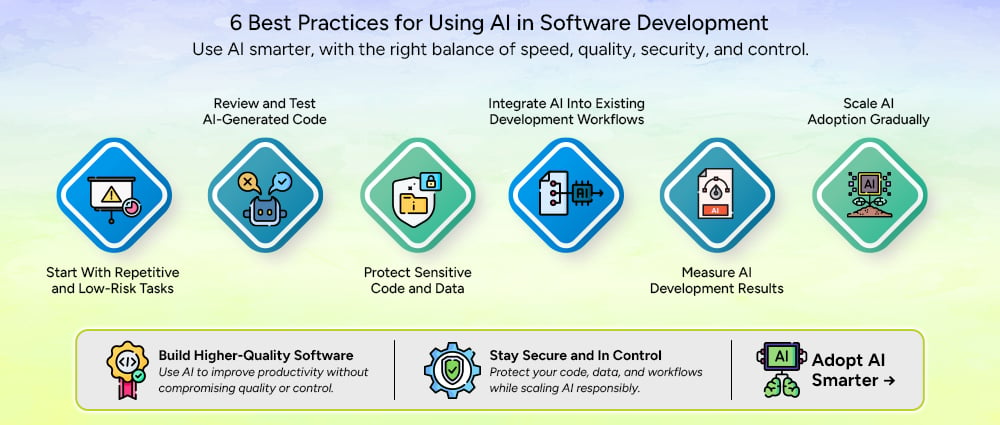
A practical starting point is to use AI for work that is repetitive and relatively easy to review.
Code formatting, basic documentation, simple test generation, boilerplate code, and similar tasks can provide an easier starting point. Developers can see where the tool saves time while still keeping the final review straightforward.
Starting small also gives teams time to understand how developers interact with AI. A tool may appear useful during a demonstration but behave differently when applied to a real codebase.
Monday recommends starting with quick wins such as automated formatting and test generation before moving toward more complex AI use cases.
AI-generated code should go through the same development checks as manually written code.
Developers should review the logic, run automated tests, check coding standards, and perform security checks before accepting the output. The review should also consider whether the code actually solves the business requirement.
This is especially important for complex or sensitive functions. A piece of code can compile successfully and still produce the wrong result.
Not every piece of information should be entered into an AI tool.
Development teams should establish clear rules for source code, credentials, customer information, internal documents, proprietary algorithms, and other confidential data. They should also understand how the selected AI service handles submitted information.
Access controls should be applied where necessary, and developers should know which approved tools they can use for different types of work.
Security should be considered before adoption rather than added after an AI workflow is already in place.
AI works best when it fits into the tools and processes developers already use.
Instead of creating a separate process for AI-generated code, teams can connect AI assistance with their IDEs, repositories, testing tools, issue trackers, project management platforms, and CI/CD workflows where appropriate.
This also makes review easier because AI-assisted changes remain part of the existing development process.
Monday recommends integrating AI with existing development workflows rather than treating it as a completely separate system.
Adoption alone does not show whether AI is actually helping a development team.
Teams should track practical measures such as development time, code review time, test coverage, defect rates, deployment frequency, and developer experience. These measures can show where AI is providing useful support and where it may be creating additional work.
For example, if AI makes code generation faster but causes much longer code reviews, the team needs to look at the entire workflow rather than measuring coding speed alone.
Teams do not need to introduce AI across every development task at the same time.
A better approach is to start with one or two clear use cases, measure the results, collect developer feedback, and adjust the process. Once the team understands what works, the same approach can be applied to additional workflows.
A phased approach also makes it easier to establish security rules, review standards, and training before adoption becomes widespread.
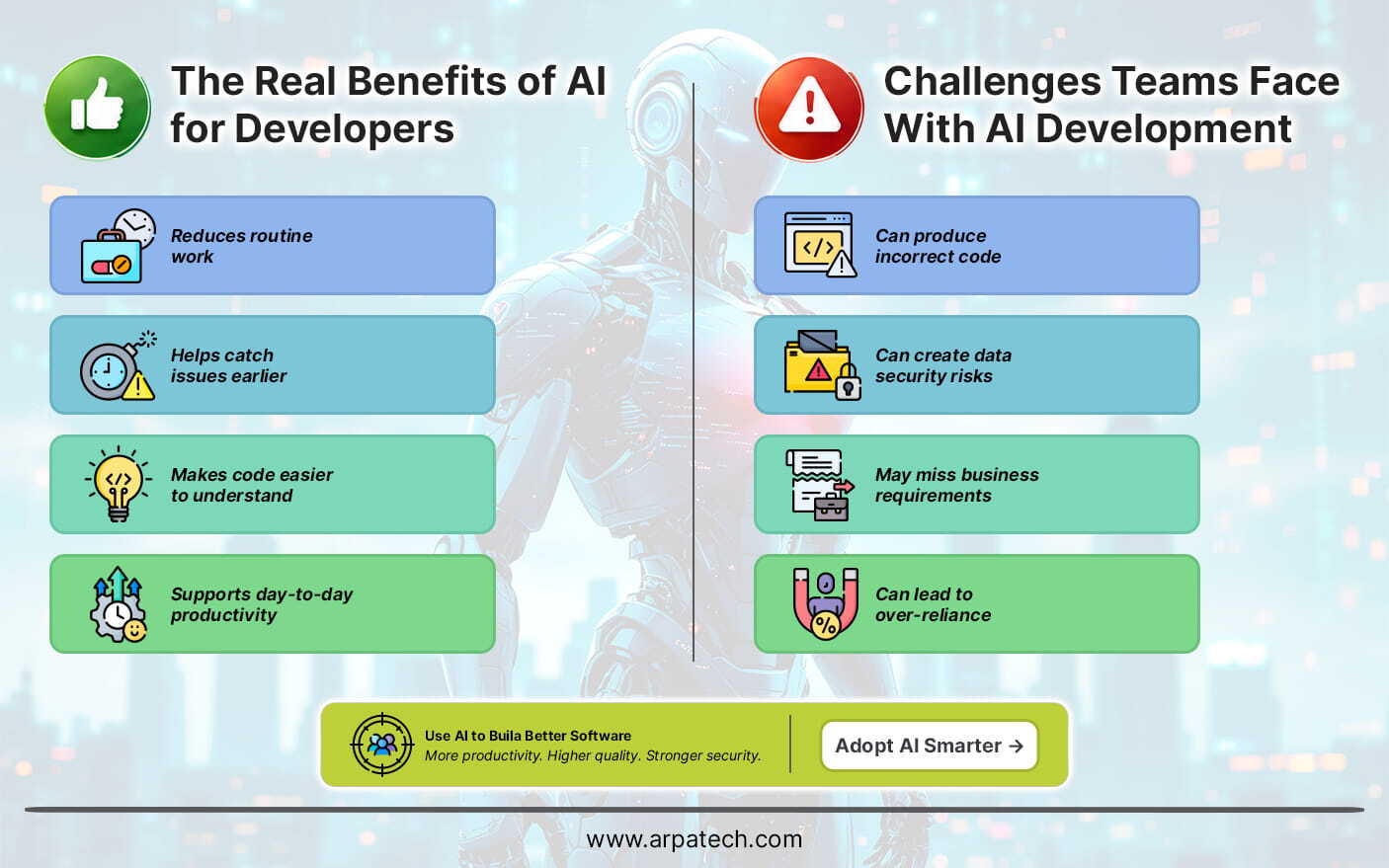
AI can be useful across different stages of software development, from planning and coding to testing and maintenance.
Productivity should be considered across the whole development process rather than measured only by the amount of code AI can generate.
Along with its benefits, AI introduces a few challenges that developers need to consider during development.
These challenges can be managed with proper testing, security controls, human review, and clear responsibility for AI-generated work.
The main difference between AI-assisted and traditional development is how work is distributed between developers and tools.
| Development Area | Traditional Approach | AI-Assisted Approach |
|---|---|---|
| Requirements | Teams review and organize requirements manually | AI can summarize requirements and suggest user stories |
| Coding | Developers write most code manually | AI can generate suggestions, functions, and boilerplate |
| Testing | Developers create and maintain test cases | AI can suggest tests and edge cases |
| Debugging | Developers investigate errors manually | AI can analyze errors and suggest possible causes |
| Documentation | Developers write documentation manually | AI can create drafts and explain code |
| Code review | Developers inspect changes | AI can identify potential issues before human review |
| Maintenance | Developers analyze existing code and issues | AI can help explain code and identify areas for improvement |
The difference does not mean that developers disappear from the process. Instead, AI changes how developers spend their time.
Some repetitive tasks can be assigned to AI, while developers focus more on architecture, business requirements, technical decisions, review, and critical thinking.
Choosing an AI tool requires more than looking at whether it can generate code. Teams should consider how the tool fits their development environment and how much control they have over its use.
Important features can include:
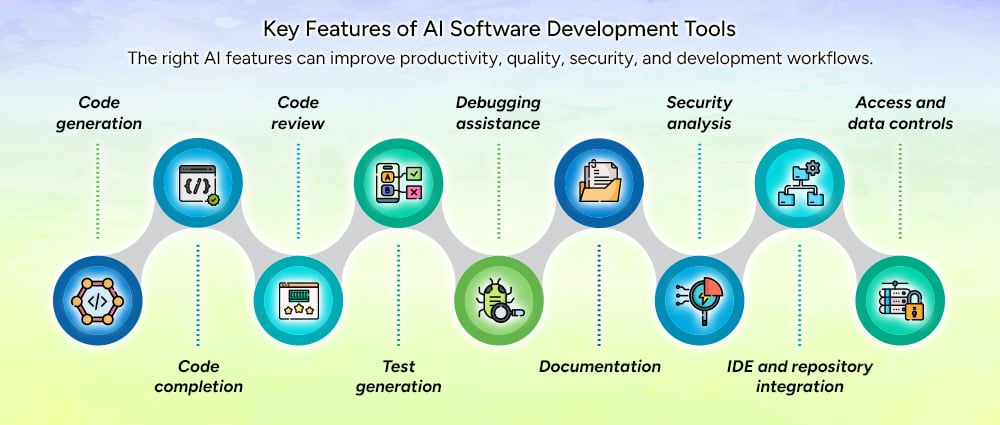
The right features depend on the team’s development environment and requirements. A tool that works well for code completion may not provide the controls needed by an enterprise team handling sensitive applications.
The role of AI in software development is likely to expand as AI tools become more closely connected with development environments and engineering workflows.
The future of AI in software development is likely to involve closer collaboration between developers and AI tools rather than removing developers from the process.
AI in software development can support almost every stage of the development lifecycle, from understanding requirements and planning projects to writing code, testing applications, fixing bugs, documenting systems, and maintaining existing software.
Automating more work does not always mean getting more value from AI. They are the ones that solve real development problems while keeping developers involved in important decisions.
Teams should start with repetitive, low-risk tasks, review AI-generated output, protect sensitive information, measure results, and expand adoption gradually. A clear process for using AI in software development helps teams gain these benefits while keeping developers involved in important decisions.
If your business is looking to build new software, modernize an existing application, or introduce AI into its development workflow, Arpatech can help you plan and implement the right approach.
Developers are using AI in software development across different stages, from analyzing requirements and generating code to testing, code review, debugging, security checks, and documentation. It can also help them understand older code and handle maintenance work. Developers remain involved throughout the process, reviewing AI-generated results and making the decisions that affect the final software.
A practical way to bring AI into an agile workflow is to start with a few specific tasks, such as creating user stories, acceptance criteria, basic tests, documentation, or development summaries. Teams can then add AI to their existing workflow by setting rules for human review, approved tools, data sharing, and measuring its results.
AI can be used at different points in the software development life cycle. It can help organize requirements during planning, generate and explain code during development, and create test cases during testing. Later, teams can use it for code reviews, debugging, documentation, security checks, and maintenance. The level of AI involvement can depend on the task, with developers keeping closer control over complex, sensitive, and business-critical work.
AI can make testing easier by generating test cases, suggesting edge cases, preparing test data, and pointing out areas that may need more testing. It can also look at failed tests and help developers find patterns behind unexpected results. However, developers still need to review AI-generated tests and use standard unit, integration, security, and acceptance testing. AI is best used alongside these testing methods, not as a replacement for them.
AI-generated code can contain logic errors, security weaknesses, or solutions that do not meet business needs. Developers still need to review and test the output, which can add extra work. Data security is another concern when using confidential code, customer information, or credentials with AI tools. Teams should set clear rules for data sharing, access, and code review.

Before we begin, please solve this quick math check to confirm you're human, and you'll be all set to start chatting with our AI assistant.
Stay connected with us to receive the latest information, updates, and insights from our world of innovation.
By entering your email address you will receive promotional updates.


© 2026 ARPATECH (ADVANCED RESEARCH PROJECTS & TECHNOLOGY)