If you run talent acquisition at a US enterprise, you already know the numbers don’t look great. Applications are up, recruiter headcount is down, and everyone above you wants roles filled faster and cost-effectively.
According to SHRM’s 2025 Benchmarking Report, the average cost per hire for non-executive roles in the United States now sits at $5,475, while executive hires cost more than six times that amount. Time-to-fill keeps climbing too, even as job openings pile up.
This is exactly why recruitment automation has now become a boardroom priority. At Arpatech, we build software for companies that are tired of watching good candidates disappear into a slow, manual pipeline. This guide walks through what recruitment automation actually does, how to evaluate it, what it costs, what it saves, and how real enterprises are using it right now.
Recruitment automation is software that takes over the repetitive, rules-based parts of hiring so your recruiters can spend their time on the parts that actually require a human. Think resume screening, interview scheduling, candidate follow-up emails, status updates, and reference checks.
A good recruitment automation system uses workflows, triggers, and AI to move candidates through your pipeline without a person manually pushing every step.
Here’s how it works in practice. A candidate applies through your career site, the recruitment automation software immediately parses the resume, matches it against the job requirements, sends an acknowledgment email, and flags the best fits for recruiter review, all pretty fast.
If the candidate gets through the first screen, the system automatically sends scheduling links. It coordinates interviewer calendars, sends reminders, and logs the feedback once the interviews are done. None of this replaces the recruiter’s judgment on who to hire, by the way. It just removes the manual busywork that seems to take a recruiter’s whole day.
This is different from simply having an applicant tracking system (ATS). An ATS stores and organizes candidate data. Recruitment automation acts on that data, moving candidates forward, triggering communications, and surfacing the right people at the right time.
Many enterprises now treat automation of the recruitment process as the connective tissue between their ATS, their HRIS, and every other tool in their hiring stack.
US enterprise recruiting teams that adopt automation recruitment strategies consistently report gains in four areas:
Not all recruitment automation tools are built the same way, and enterprise buyers have very different requirements than a 20-person startup. Before you sign a contract, run any recruitment automation system through this checklist.
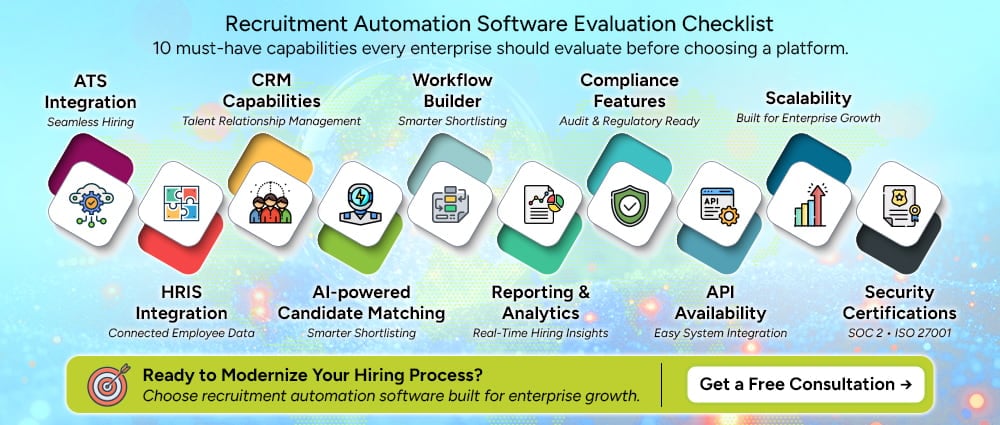
If a vendor can’t clearly answer questions in each of these categories, that’s a red flag, not a minor gap to work around later.
Every US enterprise buyer eventually has to justify this purchase to finance, and “it feels faster” doesn’t hold up in a budget meeting. Here’s how experienced HR leaders build the business case.
Start with the direct, measurable inputs:
Here’s a simplified example. Say your company makes 500 hires a year at an average cost-per-hire of $5,475, in line with the current SHRM benchmark. That’s roughly $2.74 million in annual hiring cost. If automation brings even a conservative 20% reduction in cost-per-hire, similar to the low end of the range reported across multiple 2026 industry studies, that’s over $547,000 in annual savings, before accounting for faster time-to-fill or reduced agency spend. Even a mid-six-figure software investment pays for itself quickly at that scale.
One of the biggest mistakes enterprises make is treating recruitment automation as a standalone tool bolted onto the side of their hiring process. It should sit inside a connected flow, moving data cleanly from the first candidate touchpoint all the way through to payroll.
A typical enterprise architecture looks like this:
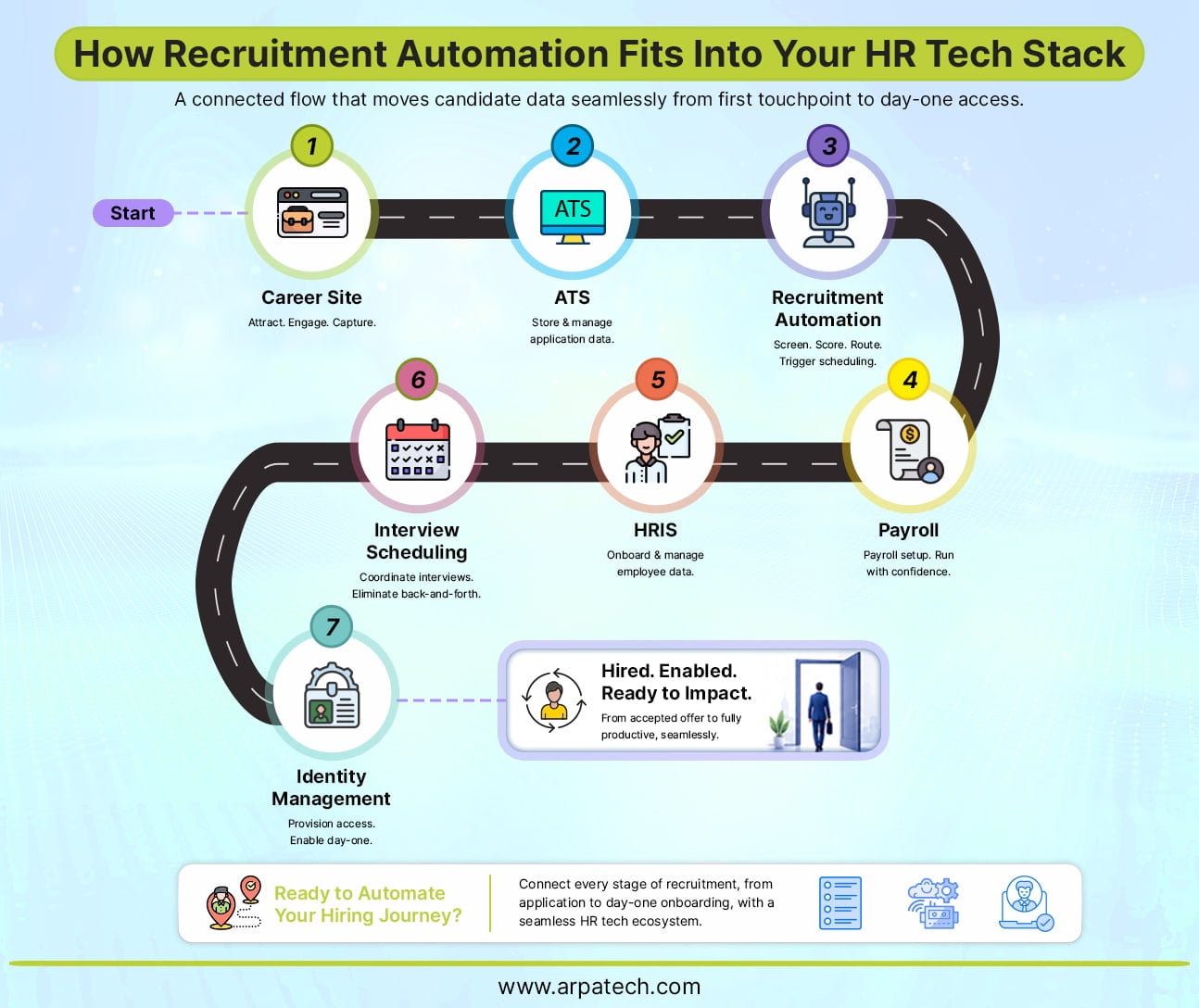
In this flow, the career site kind of captures the candidate, then the ATS stores the application data. The recruitment automation layer screens, scores and routes the person, and it triggers the scheduling pieces too. After that, once the hire is made , the candidate’s information slides into the HRIS, which then feeds payroll setup , plus identity and access management for the day-one systems access.
When the whole chain is integrated the right way, a new hire can go from accepted offer to a working laptop and email account without any single manual data transfer, at all. When it’s not integrated, you end up with duplicate data entry , delayed start dates and honestly frustrated new employees on day one.
Automation touches sensitive candidate data, and US enterprises operate under real regulatory scrutiny here. This is not a section to skim; governance, risk, and compliance are important matters to take into consideration:
Any hr automation solutions vendor worth considering should be able to walk you through exactly how their platform handles each of these points, not just point to a generic compliance page.
There is no shortage of platforms claiming to be the best recruitment automation tools on the market. Here’s how some of the more established enterprise options generally stack up, based on how they’re commonly positioned in the market.
| Platform | Best For | AI Features | Enterprise Focus |
| Workday | Large enterprises already on Workday HCM | Skills-based matching, embedded AI recommendations | Very high |
| Greenhouse | Structured, data-driven hiring processes | Predictive analytics, DEI-focused reporting | High |
| Lever | Mid-market to enterprise, strong CRM | Candidate scoring, automated nurture campaigns | Medium-high |
| iCIMS | Complex, high-volume enterprise hiring | AI text recruiter, conversational sourcing | Very high |
| SmartRecruiters | Global enterprises needing flexibility | AI-driven candidate ranking | High |
| Ashby | Fast-growing tech companies | Built-in analytics and forecasting | Medium |
| Eightfold AI | Skills-based, talent intelligence | Deep-learning talent matching across the org | High |
| Phenom | Candidate experience and recruitment marketing automation | AI chatbots, personalized career sites | High |
| Paradox | High-volume, conversational hiring | Conversational AI assistant (Olivia) for scheduling | Medium-high |
When you’re evaluating a recruitment automation system, resist the temptation to pick the platform with the flashiest AI demo. Instead, map each option against the buying checklist above and against your specific hiring volume and complexity. A platform built for high-volume hourly hiring behaves very differently from one built for specialized technical recruiting.
Generic industry examples don’t tell you much. Here’s how recruitment automation actually plays out in specific, high-pressure enterprise hiring situations.
Hiring 1,000 warehouse associates before the holiday season. A national retailer needs to staff up distribution centers fast, with a hard deadline tied to peak shopping season. Manually screening and scheduling thousands of applicants in a few weeks is simply not possible with a normal recruiting team.
Automated screening filters candidates against basic requirements instantly, and self-service scheduling lets applicants book their own interview slots without a recruiter ever touching a calendar. This is where recruitment process automation earns its budget many times over.
Scaling engineering teams across multiple US states. A tech company hiring senior engineers in California, Texas, and New York simultaneously needs consistent screening criteria and compliant, state-specific offer processes. Automation handles the repetitive parts of coordinating interview panels across time zones and keeps every candidate’s status synced across recruiters, while automatically applying the correct compliance rules by state.
Campus recruiting for Fortune 500 organizations. Large enterprises running campus recruiting programs deal with thousands of applicants from dozens of universities in a compressed window each fall. Recruitment marketing automation software helps target the right student segments, automate event registration and follow-up, and keep candidates warm between the career fair and the final offer months later.
Healthcare systems filling nursing shortages. Hospital systems are competing for a shrinking pool of licensed nurses, often against travel nursing agencies offering premium pay. Automated sourcing that continuously scans for licensed, available candidates and instantly triggers outreach gives healthcare recruiters a meaningful speed advantage in a market where candidates accept offers within days, not weeks.
Franchise hiring across hundreds of locations. A quick-service restaurant brand with 400 franchise locations needs consistent, compliant hiring workflows at every site, without a corporate recruiter managing each one individually. Automation gives local hiring managers a self-service workflow while corporate retains visibility and reporting across every location.
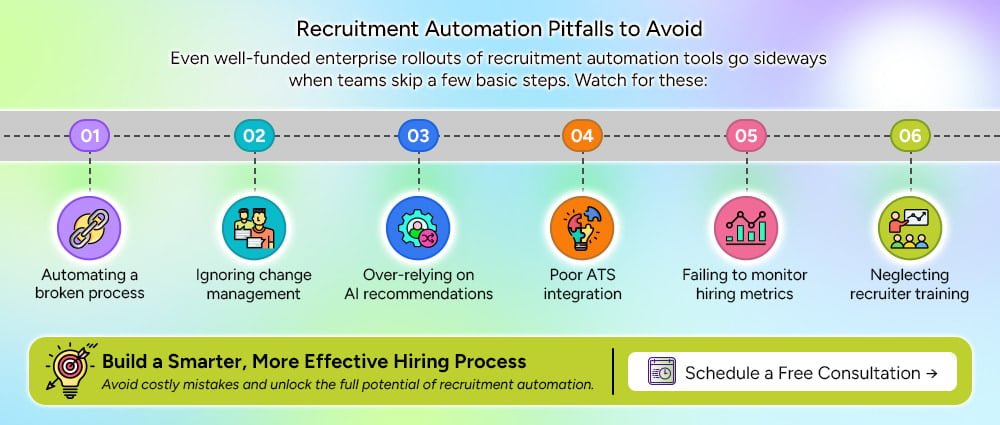
Even well-funded enterprise rollouts of recruitment automation tools go sideways when teams skip a few basic steps. Watch for these:
It’s worth zooming out for a moment. Recruitment automation is really one piece of a much broader shift toward hr automation across the entire employee lifecycle. HR automation software now touches onboarding, benefits administration, performance reviews, and even offboarding. Enterprises that treat recruitment automation as an isolated tool tend to end up with disconnected systems down the line.
Enterprises that treat it as the front door to a broader hr process automation strategy tend to get a much cleaner data flow and a better experience for both recruiters and new hires. If you’re evaluating hr automation solutions more broadly, it’s worth starting the conversation with your recruiting stack, since that’s where the candidate relationship begins.
The enterprises that get the most value from recruitment automation don’t start by buying software. They start by mapping their current hiring workflow end to end and identifying exactly where recruiters are losing the most time to manual, repetitive tasks.
From there, the smartest path is usually incremental. Automate scheduling first. Then screening. Then candidate communication. Layer in AI matching once you trust the data flowing through the system.
If you’re evaluating recruitment automation software for your organization, start by pulling your current time-to-fill and cost-per-hire numbers, since you’ll need that baseline to measure real ROI later. Talk to your recruiters about where they actually lose their time each week, not where leadership assumes they lose it. And when you demo a platform, push vendors hard on integration, compliance, and security, not just how impressive the AI features look in a sales pitch.
At Arpatech, we work with enterprises building exactly this kind of connected, compliant, and genuinely useful hiring technology. If your recruiting process still runs on spreadsheets, manual scheduling, and disconnected systems, there’s no better time than now to change that. The enterprises that automate the right way this year will be the ones filling roles fastest next year.
Let’s Fix Your Hiring Process Today!
For mid-sized companies, the best recruitment automation platforms are those that combine applicant tracking, automated candidate screening, interview scheduling, and reporting in one place.
The right choice depends on your hiring volume, budget, existing HR tools, and the level of automation you need. A good platform should be easy for recruiters to use and flexible enough to grow with your company.
Small businesses should focus on tools that are affordable, easy to set up, and cover the essentials without unnecessary features. Compare options based on pricing, applicant tracking, resume screening, interview scheduling, integrations, and ease of use.
It is also worth checking whether the platform offers a free trial or flexible plans. Choose a tool that saves your team time without adding another complicated system to manage.
AI-powered recruitment software can automate tasks such as resume screening, candidate matching, job description creation, interview scheduling, and candidate communication. Popular options include Workable, iCIMS, Eightfold AI, and Greenhouse.
When comparing AI features, look beyond automation. Check whether the tool provides useful insights, supports fair hiring practices, protects candidate data, and allows recruiters to stay involved in important hiring decisions.
Start by identifying the biggest challenges in your current hiring process. Look for an ATS that can automate repetitive tasks, organize candidate information, simplify communication, and integrate with the tools your HR team already uses.
Also consider ease of use, scalability, reporting, security, and overall cost. The best ATS should make recruiting easier for your team, not create more administrative work.
Recruitment automation can help hiring teams in a lot of ways, which include:
Arpatech can also help businesses build and integrate technology solutions that support more efficient recruitment workflows.
Start small instead of trying to automate the entire recruitment process at once. Here’s what you can do:
It is also important to regularly review your automation workflows and results. Keep human oversight in important hiring decisions, monitor the quality of AI-generated recommendations, and make adjustments as your hiring needs change.

Before we begin, please solve this quick math check to confirm you're human, and you'll be all set to start chatting with our AI assistant.
Stay connected with us to receive the latest information, updates, and insights from our world of innovation.
By entering your email address you will receive promotional updates.


© 2026 ARPATECH (ADVANCED RESEARCH PROJECTS & TECHNOLOGY)