A well-maintained and robust IT infrastructure is a necessity for organizations today. Though choosing the right service model can be challenging with so many available options now. From data security to team productivity, everything depends on how well your technology performs.
That’s why many organizations find themselves deciding between fully managed and co-managed IT services. 72% of enterprises outsource IT management to Managed Service Providers.
Each approach offers its own advantages in IT help desk services, and the right choice depends on your internal resources, budget, and long-term plans. Ultimately, the model you select can shape how efficiently your IT runs and how effectively your business grows.
In this blog, you will explore both types of IT services.
Fully managed IT services refer to the complete IT support outsourcing to a third-party provider. Unlike traditional IT support that resolves issues as they arise, fully managed services proactively monitor, maintain, and optimize your IT infrastructure around the clock.
A comprehensive, fully managed IT services package may include:
A fully managed IT service uses modern tools and support to ensure your business operates smoothly.
Continuous monitoring on servers, routers, switches, and firewalls helps keep everything running smoothly and prevents downtime.
RMM tools enable MSPs to remotely monitor and control systems, networks, and devices. They enable quick issue resolution, automate maintenance and updates, and provide performance reports to minimize downtime and costly repairs.
Learn more: How does Remote Managed IT Service Work?
24/7 support for hardware, software, and user problems. Users can send requests through phone, email, or a web portal. Problems are handled remotely or on-site when necessary, providing quick responses and seamless IT support.
Protection against cyber threats through firewalls, antivirus software, endpoint security, email security, and threat monitoring.
Regular backups and a recovery plan allow systems to be swiftly restored after data loss, cyberattacks, or failures.
Management of cloud infrastructure, Microsoft 365, Google Workspace, storage, and applications keeps operations running smoothly.
Routine updates and security patches maintain system security and compliance.
When you have Smart IT planning and consulting in your business, your budgeting and technology planning align systems with your business goals.
Monitoring your systems and apps ensures they work reliably, helping prevent downtime, performance issues, and unexpected disruptions. Regular infrastructure management also improves security, keeps systems updated, and ensures your business operations run smoothly.
Systems are maintained to meet regulatory standards and industry compliance requirements.
Coordination and communication with third-party technology vendors is handled on behalf of the organization.
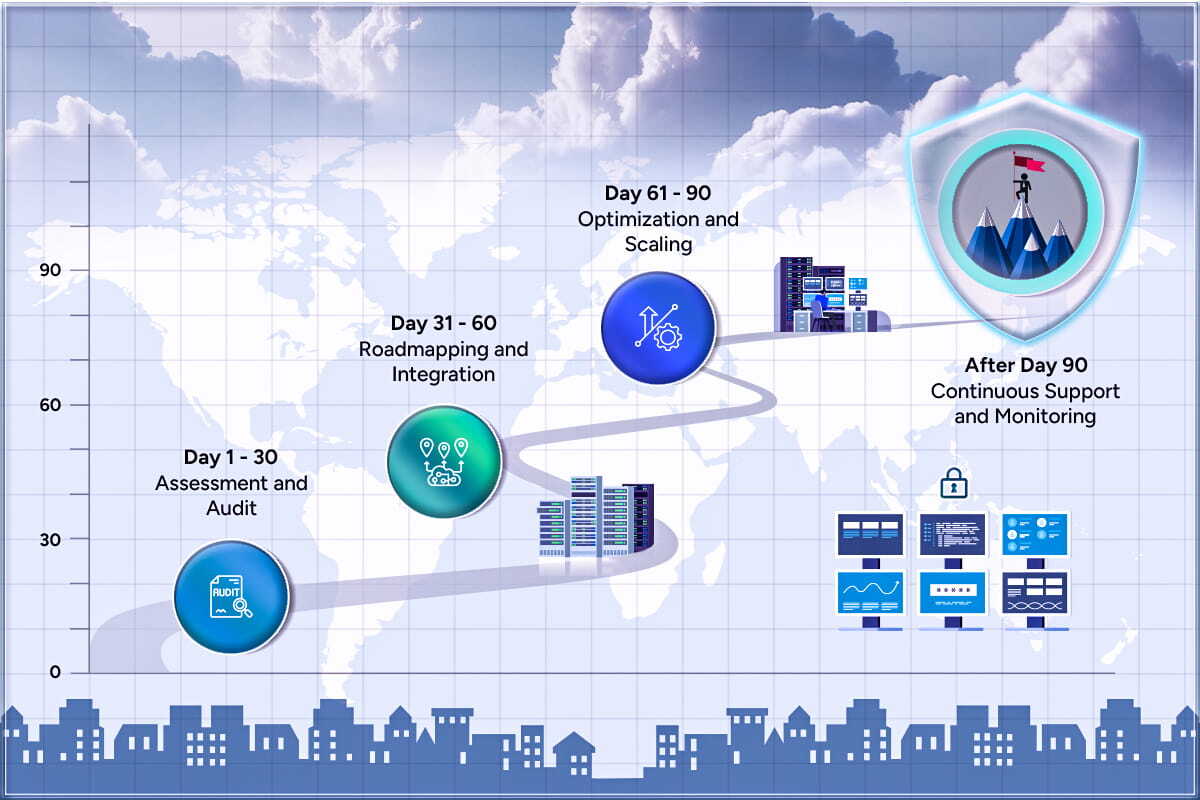
Managed IT services make it easier to understand how the onboarding process works. They give a clear idea of what to expect, showing the timeline, key steps, who does what, and common successes that clients usually experience. This is how the first 90 days go:
Co-managed IT services work alongside your in-house IT team. Instead of taking full control, a co-managed model provides additional expertise, staffing flexibility, and specialized support where it’s most needed.
Businesses that typically benefit from co-managed IT services include larger organizations with existing IT teams, companies undergoing digital transformation, and enterprises seeking expertise in specialized areas such as cybersecurity or network management.
|
Feature |
Fully Managed IT Services |
Co-Managed IT Services |
|
Scope |
The provider handles all IT operations, infrastructure, and maintenance. | The provider works alongside your internal IT team to fill gaps and provide additional support. |
|
Control |
IT responsibilities are fully outsourced to the service provider. | Decision-making and IT management are shared between the provider and your in-house team. |
|
Cost |
Typically, a fixed monthly fee with predictable budgeting. | Flexible pricing based on required services and level of involvement. |
|
Expertise |
Full access to a broad team of IT professionals across multiple specialties. | Access to specialized skills and expertise that complement internal staff. |
|
Ideal For |
Small to medium-sized businesses that do not have a dedicated IT staff. |
Larger organizations that already have an internal IT department. |
|
Security |
Continuous monitoring, maintenance, and comprehensive cybersecurity management |
Both the IT provider and your internal team work together to keep systems secure. |
| Scalability |
Easily scales complete IT infrastructure as the business grows. |
Scales additional support and expertise as needed. |
|
Support |
24/7 help desk, remote and on-site support included. |
Supplemental, overflow, or project-based support when required. |
Choosing between Fully Managed and Co-Managed IT Services starts with understanding your organization’s specific needs, internal capabilities, and long-term objectives. Co-managed services are ideal if you already have an IT team but need additional expertise or support for certain functions or projects.
Managed services look after everything IT-related, whether it’s routine tasks or planning for growth. Before you decide, think about your resources, your growth goals, and how much control you want over your IT setup.
Partner with Arpatech, and let our IT experts help you determine the solution that best supports your business today and scales with you tomorrow.
Costs vary based on services required, ranging from $75 to $200 per hour or a fixed monthly retainer, depending on the agreement.
Managed IT services typically include network monitoring, cybersecurity, cloud management, help desk support, data backup, and IT consulting.
Managed IT services pricing depends on how big the business is and how complex the services are, typically between $1,000 and $5,000 per month for small and mid-sized businesses.
Fully managed IT services provide proactive, end-to-end management, whereas traditional IT support is reactive, fixing issues as they occur.
Managed IT Services for small businesses benefit them by saving money, keeping systems secure, offering expert help, and letting business owners focus on growing their business instead of worrying about IT.
Check that they offer round-the-clock monitoring, strong security, cloud services, data backups and recovery, certified IT experts, and solutions that can grow with your business.


Before we begin, please solve this quick math check to confirm you're human, and you'll be all set to start chatting with our AI assistant.
Stay connected with us to receive the latest information, updates, and insights from our world of innovation.
By entering your email address you will receive promotional updates.


© 2026 ARPATECH (ADVANCED RESEARCH PROJECTS & TECHNOLOGY)