In today’s fast-moving business world, success involves more than just daily tasks such as protecting your data, efficient IT systems, and reduced downtime. For small and medium-sized businesses, managing IT internally can be overwhelming and costly. Remote managed IT services offer a solution by allowing companies to hire experts to monitor and maintain systems off-site, enabling them to focus on growth and their primary goals.
In this guide, you will:
Remote managed IT services allow businesses to have a dedicated IT team without the expense and complexity of maintaining an internal IT team. Rather than hiring full-time staff, companies work with a third-party provider to monitor, support, and manage their technology remotely. This can include software updates, network security, hardware troubleshooting, system performance optimization, and cloud infrastructure management.
These services use the internet and advanced tools to remotely monitor and manage systems. With RMM, IT professionals can track system health, detect issues, apply patches, and resolve problems in real time, without being physically present in your office.
Learn how remote managed IT services operate in real businesses and how companies benefit from proactive remote IT management:
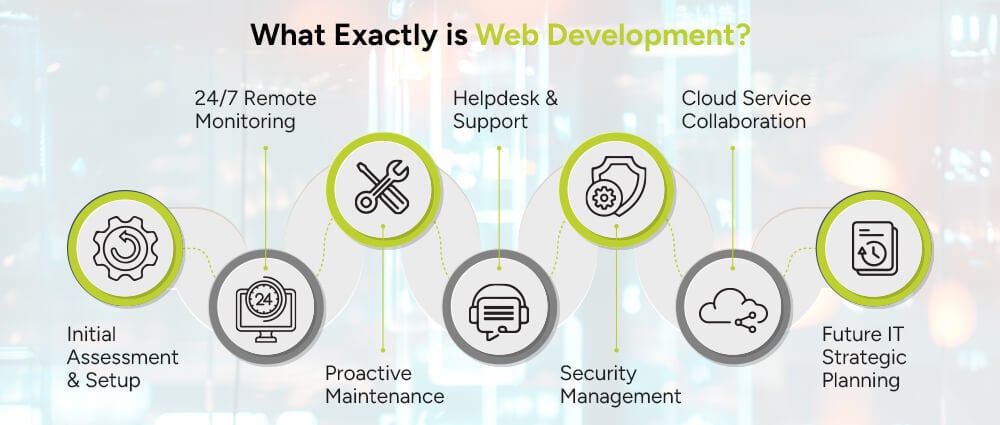
The process starts with a thorough review of your current IT setup. The service provider looks at your hardware, software, network, and security to find weaknesses, performance issues, and possible risks.
Based on this assessment, they develop a personalized service plan based on your business needs. The onboarding process usually includes:
This initial setup makes sure your infrastructure is ready for secure and reliable remote managed services.
After onboarding, your IT infrastructure is continuously monitored using RMM tools that detect issues like failing hardware, low disk space, or unusual network behavior. By catching problems early, remote managed IT support ensures operations stay uninterrupted and the business runs efficiently.
If employees have technical issues, they can contact the provider’s help desk for quick assistance. The support team addresses problems such as password resets, software errors, and hardware problems. Utilizing encrypted remote systems, they quickly resolve problems, ensure low disruption, and offer reliable remote IT support.
When employees run into tech problems, they can contact the provider’s helpdesk for fast, remote assistance. From forgotten passwords to application crashes, the support team is just a call or ticket away.
Security is a critical aspect of managing remote IT systems. Your remote IT team monitors potential threats, updates antivirus software, manages firewalls, and uses encryption protocols to safeguard sensitive data. As cyber threats grow, implementing strong security practices has become essential, especially for organizations handling sensitive information, like healthcare providers and financial institutions.
For businesses using cloud platforms like Microsoft 365, Google Workspace, or Salesforce, remote IT providers are essential. They manage cloud environments and help with smooth integration. Their main tasks include:
These efforts allow teams to collaborate securely and effectively in cloud-based environments.
A critical benefit of working with a remote managed IT services provider is getting help with IT planning. Instead of just fixing problems, these providers assist organizations in creating long-term technology plans that support their business goals.
To better understand how all of this works, here are some essential parts of a typical remote IT setup:
This tool continuously monitors your computers, servers, and networks from anywhere. It helps spot issues early, often before you even notice a problem, reducing downtime and keeping your business operations running smoothly. Advanced RMM solutions can also automate routine maintenance tasks, such as system checks and updates.
IT professionals continuously back up your files, databases, and systems to keep them safe. If hardware fails, a human error occurs, or a cyberattack happens, you can quickly restore your data to minimize disruption. Many services also offer cloud-based recovery options, enabling businesses to resume operations almost instantly.
Automatic updates and timely patching protect your systems from threats and ensure reliable operation. By patching on time, you block vulnerabilities that hackers often exploit and maintain the stability and performance of your IT environment.
Your IT team manages cloud platforms like Microsoft 365 and Google Workspace and oversees virtual servers. They keep your data secure, run applications smoothly, and use resources efficiently. Cloud management simplifies users’ access to services, improves collaboration, and helps you comply with data regulations.
Cybersecurity solutions include antivirus software, firewalls, intrusion detection systems, and endpoint protection tools. These tools help protect your devices, networks, and sensitive data from threats like viruses, ransomware, and phishing attacks. Continuous monitoring and regular updates keep your security strong.
A dedicated remote team provides tech support whenever you need it. They troubleshoot issues, answer questions, and guide you to keep your systems running smoothly. This support minimizes downtime and lets employees focus on their core work without IT interruptions.
Regular reports give you a clear view of your IT systems’ health, performance, and security. Analytics help identify trends, highlight potential risks, and inform strategic decisions. With this data, businesses can plan upgrades, optimize resources, and make smarter IT investments.
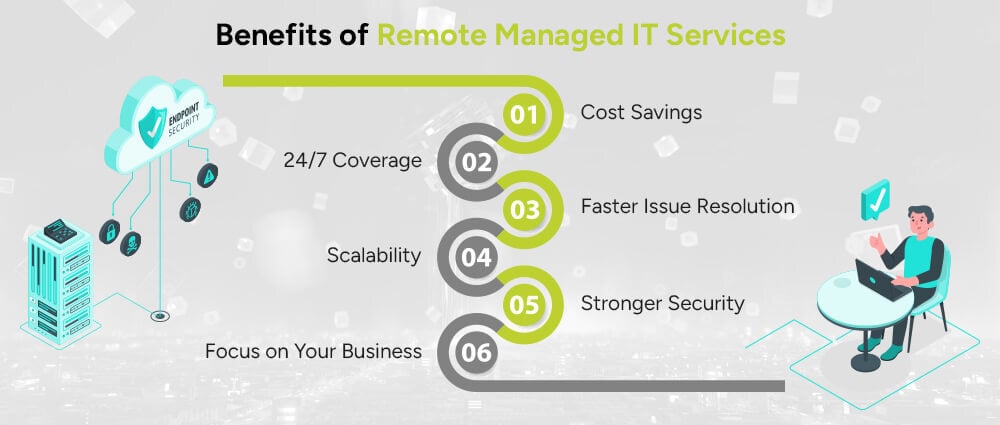
Many businesses are now choosing remote managed IT services for several factors.
With remote managed IT services, businesses can focus on growth while IT operations run smoothly in the background.
Choosing the right provider can help you get the most out of your IT investment and keep your systems running smoothly. Here are some important factors to keep in mind:
Small businesses often encounter IT challenges while working with limited budgets and employees. Remote managed IT services offer practical solutions that support these businesses to compete effectively:
For more insights, check our blog on managed IT services for small businesses in US: What to know in 2026
Remote managed IT services give businesses access to expert IT support without the cost of maintaining an internal IT team. They help improve security, reduce downtime, and support business growth, all while being managed remotely.
Whether you’re a small business or a growing organization, these services keep your IT systems reliable. This way, you can focus on what matters most: running and growing your business.
If you’re ready to set up a remote managed IT monitoring solution, connect with the IT help desk Experts at Arpatech . The future of IT management is remote, and it’s more efficient than ever.
Your business won’t stay the same size forever, and neither should your IT services. A scalable provider can:
Costs for remote managed IT services depend on your company’s size, how many users and devices need support, the services you choose, and the provider’s pricing models (per-user, per-device, or flat-rate).
More comprehensive services, such as cybersecurity, cloud management, and 24/7 monitoring, typically increase overall costs but also deliver greater value and reliability.
To understand pricing models and ROI in detail, Learn more in our guide on managed IT costs and ROI.
Fully managed IT services mean outsourcing all IT operations to a third-party provider. The service provider handles everything, including monitoring, cybersecurity, maintenance, helpdesk support, and IT strategy, making it ideal for businesses without an internal IT team.
Co-managed IT services allow your internal IT team to work with an external provider. Your team manages routine IT tasks, while the provider handles specialized areas such as security, cloud systems, and network monitoring. This approach is ideal for businesses that already have IT staff but need additional support and flexibility.
For a detailed comparison, read our guide on fully managed vs. co-managed IT services.


Before we begin, please solve this quick math check to confirm you're human, and you'll be all set to start chatting with our AI assistant.
Stay connected with us to receive the latest information, updates, and insights from our world of innovation.
By entering your email address you will receive promotional updates.


© 2026 ARPATECH (ADVANCED RESEARCH PROJECTS & TECHNOLOGY)