Every few months, a major cyberattack makes national headlines. A hospital gets crippled by ransomware. A retailer exposes millions of customer records. A government contractor suffers a data breach with national security implications. And almost every time, investigators find the same uncomfortable truth buried in the post-mortem: the vulnerability that was exploited had a patch available weeks or even months before the attack. It just was never applied.
That is not a technology problem. It is a strategy problem.
A strong patch management strategy is the difference between an organization that stays ahead of threats and one that is constantly reacting to them. But building that strategy is harder than it sounds. IT teams are stretched thin, business owners resist downtime, legacy systems resist patches entirely, and the volume of vulnerabilities being disclosed every year continues to climb. Getting patching right means finding a way to balance speed, security, and business continuity all at once, and that requires more than just downloading updates when a vendor releases them.
This guide will walk you through everything you need to know, from what is Patch management, understanding why patching fails to building a mature, enterprise-grade approach that actually works.
This blog covers everything you need to know about building a patch management strategy that balances speed, security, and business continuity. Here is what we walk through:
When software companies discover bugs or security flaws in their products, they release fixes called patches. Patch management is the process of identifying, testing, and applying those fixes across your organization’s systems in a consistent, timely way.
Think of it like routine car maintenance. Skip an oil change once and you will probably be fine. Keep ignoring it and you are looking at a much bigger, more expensive problem down the road. Unpatched software works the same way. A single ignored vulnerability can be all an attacker needs to break into your network.
In a business environment, patch management covers everything from operating systems and browsers to network devices and third-party applications. With hundreds of patches released every month across dozens of vendors, having a structured process is not optional. It is the difference between staying ahead of threats and constantly reacting to them
A lot of organizations treat patching like a chore, something IT handles in the background when they get around to it. That mindset is increasingly dangerous. The threat landscape has fundamentally changed. Vulnerability exploitation has become faster, more automated, and more targeted than ever before.
According to the Cybersecurity and Infrastructure Security Agency (CISA), many of the successful ransomware attacks in the US exploit known, patchable vulnerabilities. These are not zero-days or sophisticated nation-state exploits. They are vulnerabilities that already have fixes available. The problem is that organizations are not applying those fixes fast enough, or not applying them at all.
A formal patch management strategy gives IT and security teams a clear, repeatable way to find, test, and install updates across all systems.
It clearly defines who is responsible for what, how quickly patches should be applied, how exceptions are handled, and how progress is tracked. Without this structure, patching becomes random and inconsistent, which increases the chances of missing important updates.
Past security, a proper strategy also helps keep the business running smoothly. Poorly tested patches can break applications, cause downtime, or create new technical issues.
A good approach includes testing updates before release, rolling them out in stages, and having a rollback plan ready. This ensures that fixing one issue does not accidentally create several new ones.
Every IT team must navigate one critical conflict that exists between their two main operational needs. The security measure which provides maximum protection through immediate patching creates operational challenges which users consider highly dangerous. Patches can disrupt current software operations because they lead to unexpected system restarts and they disable custom settings which require extended development time to implement.
This situation establishes a condition which IT specialists refer to as the patch management paradox. Security teams push for speed. IT operations push for stability. Business owners push for uptime. The patching process encounters delays because it requires decision makers to choose between different options that are available at that moment.
The longer patches wait, the more exposure the organization accumulates. But rushing patches into production without testing can cause just as much damage as the vulnerabilities they are meant to fix. A botched patch that takes down a critical ERP system on a Monday morning can cost a company more in lost productivity than the breach it was supposed to prevent.
Resolving this paradox is not about picking a side. It is about building a process sophisticated enough to move quickly on critical vulnerabilities while still protecting operational stability.
That means having different response timelines for different risk levels, having a reliable test environment, and having clear communication channels between security, IT, and the business.
The numbers are hard to ignore. The Ponemon Institute has consistently found that a significant majority of data breaches involve known vulnerabilities that had patches available.
The Verizon Data Breach Investigations Report echoes this year after year. Exploitation of known vulnerabilities is not just common, it is the dominant attack vector for financially motivated threat actors.
The reason is simple economics. Attackers are not trying to be clever. They are trying to be efficient. Writing a custom exploit for an unknown vulnerability takes significant skill and time. Scanning the internet for systems still running a version of software with a known, publicly disclosed vulnerability takes minutes. Tools like Shodan and Censys make it trivially easy for attackers to find exposed systems at scale.
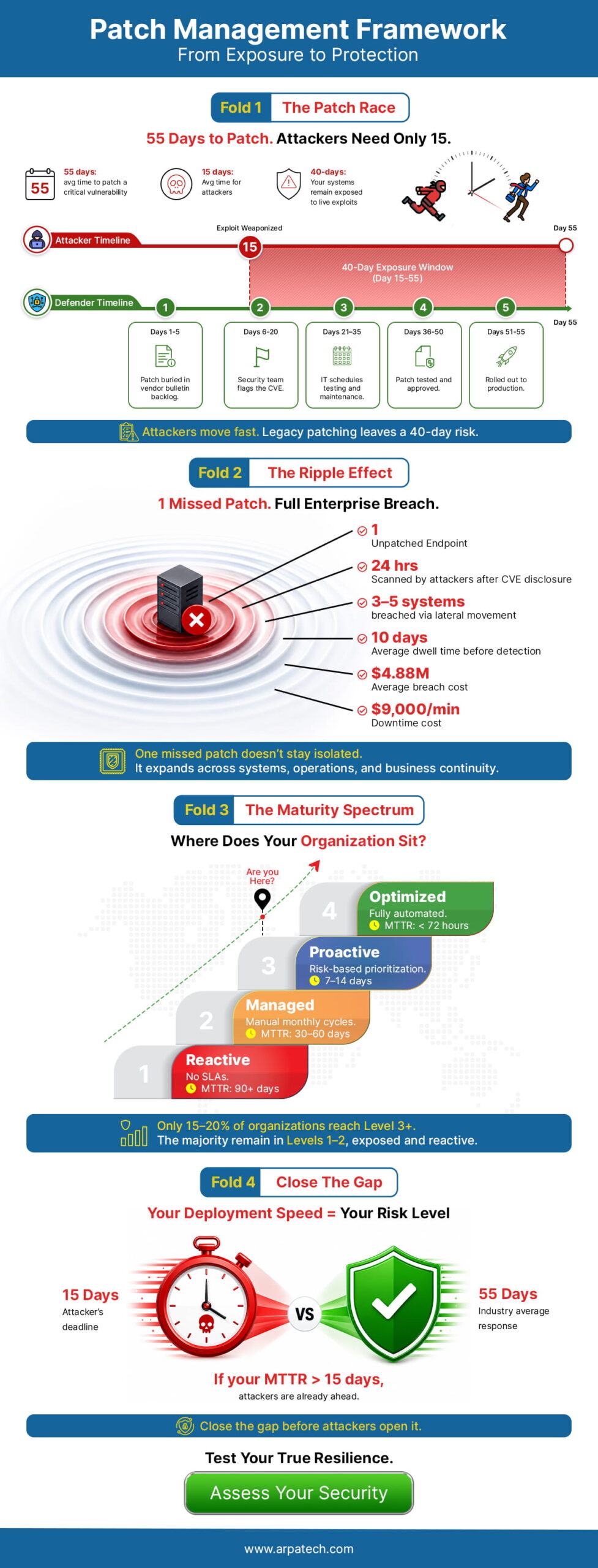
Once a vulnerability is disclosed and a patch is released, the clock starts ticking. Researchers have documented that the time between patch release and widespread exploitation has shrunk dramatically over the past several years. What used to take months now sometimes takes days. In some high-profile cases, weaponized exploits appeared within hours of a vulnerability disclosure.
This means that organizations with slow, reactive patching cycles are operating with a window of exposure that attackers are actively hunting for.
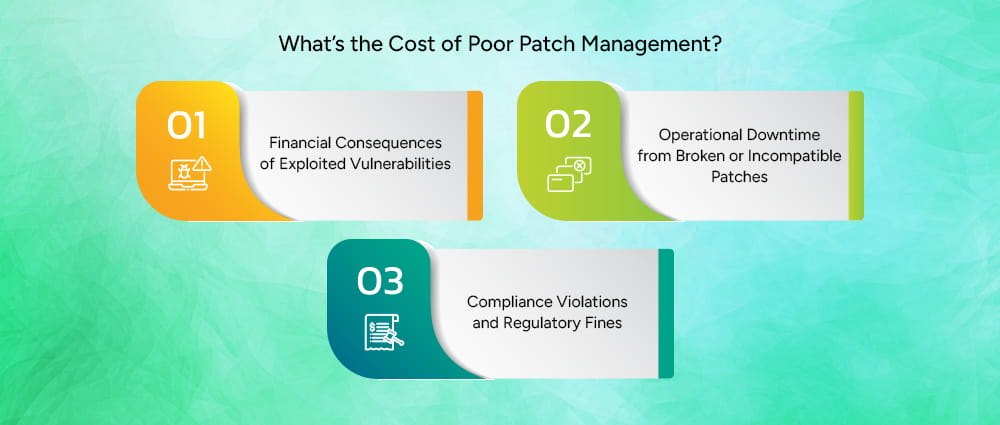
The financial cost of a successful cyberattack in the US has never been higher. IBM’s Cost of a Data Breach Report consistently puts the average cost of a US data breach in the millions, and ransomware incidents routinely run into the tens of millions when you factor in recovery costs, legal fees, regulatory fines, and lost business.
The 2021 Colonial Pipeline ransomware attack, exploited a compromised VPN without multi-factor authentication on a legacy account, this led to fuel shortages across the eastern US and a reported ransom payment of approximately $4.4 million. The 2017 Equifax breach, which exploited an unpatched Apache Struts vulnerability despite a patch being available for months, resulted in a $575 million settlement with the FTC.
These are not irregularities. They are examples of what happens when patching is treated as optional.
Bad patches can also create serious problems. In 2024, a faulty update to the CrowdStrike Falcon sensor caused a global IT outage. Millions of Windows systems stopped working, which disrupted airlines, hospitals, banks, and media companies.
Even though this was a security software update and not an operating system patch, it shows an important lesson: how updates are released matters just as much as the updates themselves.
A strong patch management process helps prevent this kind of failure. It includes proper testing before release, approval steps, and rolling out updates in stages instead of all at once. This reduces the risk of large-scale outages and keeps systems stable.
For US organizations operating in regulated industries, poor patch management is not just a security risk, it is a compliance risk. HIPAA requires healthcare organizations to implement security updates to protect electronic protected health information.
PCI DSS mandates that organizations maintain a process for timely patching of all system components. NIST frameworks, FedRAMP, and SOC 2 all include patching requirements.
Regulators and auditors are increasingly scrutinizing patch compliance. HIPAA penalties can reach $1.9 million per violation category per year. The SEC has also increased its focus on cybersecurity practices, including vulnerability management, for publicly traded companies.
You cannot patch what you do not know exists. Asset inventory is the unglamorous foundation of every effective patch management strategy.
This means maintaining an accurate, continuously updated inventory of every device, operating system, application, and firmware version across the environment, including endpoints, servers, network devices, cloud instances, and operational technology.
Modern automated patch management software can automate much of this, but the process requires ongoing attention. New devices get added, old ones get forgotten, and shadow IT (unauthorized systems and applications that employees spin up without IT approval) creates invisible blind spots that attackers love to find.
Knowing what systems you have is only helpful if you also know what security issues they may have.
Vulnerability scanning tools like Tenable Nessus, Qualys, and Rapid7 help with this. They constantly check your IT environment to find weaknesses in systems and applications.
These tools compare what they find against known security issue databases like the National Vulnerability Database and the CISA Known Exploited Vulnerabilities Catalog, which list publicly known and actively exploited vulnerabilities.
This helps organizations quickly understand which assets are at risk and need urgent patching.
Layering in threat intelligence enriches this further. Not every high-CVSS vulnerability is being actively exploited in the wild, and knowing which ones are actively targeted helps teams allocate limited resources more effectively.
Not all patches are equal, and treating them as if they were is one of the most common and costly mistakes in patch management planning. A critical vulnerability on an internet-facing server that handles payment processing is categorically more urgent than a medium-severity vulnerability on an internal workstation used for scheduling.
Risk-based prioritization considers:
Frameworks like SSVC (Stakeholder-Specific Vulnerability Categorization) or the CISA KEV catalog provide structured ways to make these prioritization decisions systematically rather than intuitively.
Before any patch goes into production, it should be tested in an environment that mirrors production as closely as possible. This catches compatibility issues, application conflicts, and configuration problems before they affect real users and systems.
Testing should include functional testing of affected applications, regression testing to ensure existing functionality is not broken, security validation to confirm the patch actually addresses the vulnerability, and performance testing for patches affecting high-load systems.
Even after testing, patches should be deployed in phases rather than all at once. A phased approach typically starts with a small pilot group (often IT staff or volunteers), expands to a broader test population, and then rolls out to the full environment. This limits the blast radius of any unforeseen issues.
Equally important is verification. Confirming that a patch was successfully installed is not the same as assuming it was. Automated verification scans should confirm patch deployment and flag any endpoints where installation failed or was skipped.
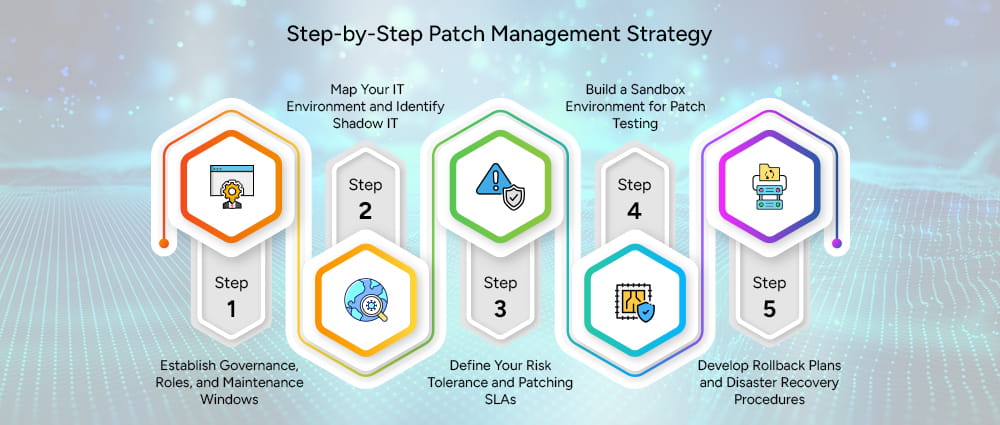
Define who is responsible for identifying vulnerabilities, who approves patches for deployment, who executes deployments, and who verifies success.
In larger organizations, this usually involves a cross-functional patch management team that includes IT operations, security, and representatives from major business units.
Maintenance windows, designated periods when systems can be taken offline for patching, should be established in advance and communicated broadly. Emergency patching procedures for critical zero-day vulnerabilities need separate, expedited approval processes.
Conduct a thorough risk assessment of your entire IT environment. Use automated patch management tools to find every managed and unmanaged device. Pay particular attention to:
Shadow IT is a particular concern. Employees regularly spin up cloud services, install applications, and connect personal devices without IT knowledge. These assets are often the least patched and the most vulnerable.
Document clear SLAs for patch deployment based on severity. A common framework looks like this:
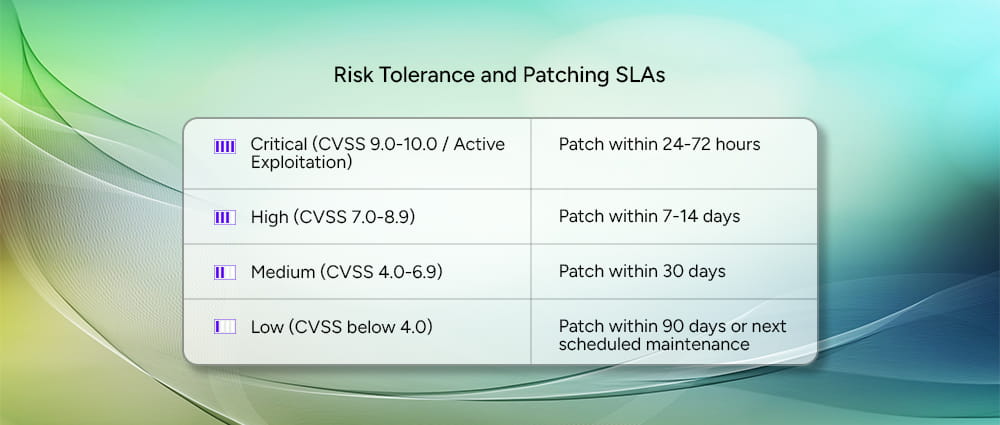
Not every vulnerability needs to be treated as an emergency. Critical vulnerabilities, especially those already being actively exploited in the wild, should be patched within 24 to 72 hours. High severity issues give you a slightly longer window of 7 to 14 days, while medium severity vulnerabilities should be resolved within 30 days. Low severity issues are the least urgent and can typically wait until your next scheduled maintenance window, as long as that falls within 90 days.
These SLAs should be formally documented, reviewed annually, and adjusted based on threat intelligence and business risk.
You should create a testing environment which exactly duplicates your actual production systems. The testing environment must include various configurations of essential applications and systems. Organizations need to establish multiple testing environments which serve different business operations and system categories because their operational frameworks are complicated.
Cloud environments make this more accessible than ever. Spinning up a replica environment in AWS or Azure for patch testing is significantly cheaper than it used to be, and it enables faster, more thorough testing cycles.
Every patch deployment should have a documented rollback plan. If a patch causes problems in production, the team needs to be able to revert quickly and cleanly. This requires:
The shift to hybrid and remote work has created a persistent headache for patch management teams. Endpoints that are rarely or never on the corporate network are difficult to inventory, scan, and update through traditional on-premises tools.
The solution involves deploying cloud-based endpoint management platforms (like Microsoft Intune, Jamf, or similar tools) that can reach devices regardless of network location.
VPN usage can be used for scanning, but cloud-native management is increasingly the preferred approach for modern distributed workforces.
Many US organizations, particularly in manufacturing, healthcare, and government, run critical systems on operating systems and applications that vendors no longer support. Windows Server 2008, Windows 7, and older versions of industrial control software continue to run critical infrastructure despite being years past end-of-life.
When patches are simply not available, compensating controls become essential. Network segmentation isolates legacy systems from the rest of the environment.
Web application firewalls and intrusion prevention systems can provide virtual patching. Strict access controls and monitoring add additional layers of protection.
IT teams hear “no” from business owners all the time when it comes to patching. The reasons are usually the same: we can’t afford the downtime, or the last update broke something important. Those concerns are fair, and dismissing them only makes the relationship worse.
The fix is to stop speaking in technical terms and start speaking in business language. A business owner does not know what a CVSS score is. What they do understand is money and time. Tell them that skipping this patch leaves their ERP system exposed to a ransomware attack that could shut operations down for a week, and suddenly a two-hour maintenance window sounds a lot more reasonable.
It also helps to have a formal exception process. Give business owners a legitimate way to request a delay, document the risk they are accepting, and put temporary safeguards in place in the meantime. People push back less when they feel heard and have options rather than just a deadline.
Security teams use tools that find weaknesses in systems, while IT teams use separate tools to install updates and manage devices. The problem is that these tools often don’t connect with each other. This means vulnerability information stays in one system, while the actual fixing work happens in another.
When these systems are connected using integrations, APIs, or automation platforms, the process becomes much smoother. For example, when a serious vulnerability is detected, the system can automatically create a task in the IT service system, assign it to the right team, and track it until the issue is fully fixed and confirmed.
Here are some advanced strategies that IT professionals should know about patch management that can help them get rid of vulnerabilities faster and more effectively.
Virtual patching uses network-level controls like intrusion prevention systems and web application firewalls to block exploit attempts against known vulnerabilities without actually modifying the vulnerable system.
It is not a permanent solution, but it is an important bridge for assets that cannot be immediately patched.
Network segmentation limits the blast radius if a vulnerable system is compromised. By placing legacy and unpatchable systems in isolated network segments with strict access controls and traffic monitoring, organizations can contain the damage from a successful exploit.
For organizations with active software development, patch management cannot be separate from the development process. Integrating vulnerability scanning into CI/CD pipelines ensures that base images, container dependencies, and third-party libraries are scanned for vulnerabilities before code is deployed.
This shifts patching left, catching issues earlier in the development process when they are cheaper and easier to fix. Tools like Snyk, Dependabot, and Prisma Cloud integrate directly into development workflows to automate this process.
Traditional patching, where you find a vulnerability and push a fix to a running system, does not really work in modern cloud environments.
With containers, you do not patch the running container. You update the base image it was built from and rebuild it. That means keeping those base images current and regularly scanning your container library for vulnerabilities is how patching works in this world.
Serverless is a bit different. The cloud provider (AWS, Azure, Google Cloud) handles patching the underlying infrastructure for you. But the code your developers wrote, and the third-party libraries it depends on, are still your responsibility. Automated patch management software that scan those dependencies and flag outdated or vulnerable packages are what keep serverless environments secure.
Managing patches manually across a large organization is not realistic. When you have thousands of devices, hundreds of applications, and a constantly changing environment, there is simply no way for a human team to keep up without help.
Automated scanning tools solve this by continuously watching your environment, finding vulnerabilities, and cross-referencing them against up-to-date threat intelligence to flag what actually needs attention. When these tools are connected to your asset inventory, your team gets a live picture of where the organization stands without anyone having to run manual checks.
Here is the scale problem: over 28,000 new vulnerabilities were publicly disclosed in 2023 alone. No team can manually sort through that and make smart decisions fast enough. This is where machine learning earns its place.
Instead of just ranking vulnerabilities by their severity score, ML-powered tools look at a much bigger picture: Is this vulnerability being actively exploited right now? Does it affect a system critical to the business? Has this type of flaw been weaponized before? Tools like Tenable.io, Qualys, and Rapid7 use this approach to help teams focus their energy on the vulnerabilities that are most likely to cause real damage, not just the ones with the highest numbers on paper.
The most advanced programs automate the entire workflow from start to finish. Once a patch is approved, automated tools can push it out to the right systems during scheduled maintenance windows, track whether it’s installed correctly, and send alerts if something fails. Some tools can even kick off a fix automatically when a deployment goes wrong.
Getting to this level takes real investment upfront in the right tools and processes. But the payoff is significant: patches get applied faster, human error is reduced, and IT staff get time back to focus on work that actually requires their expertise.
Mean Time to Remediate (MTTR) rellates to how long it takes, on average, to fix a security issue after it is found. It tracks the time from discovering a vulnerability to fully applying the patch. Breaking this down by severity helps organizations see if critical issues are being fixed quickly enough and where delays are happening.
Patch coverage means how many systems or devices have been updated with the required patches within the set time limit (SLA). For a strong security program, a good goal is to patch at least 95% of critical vulnerabilities within the agreed timeframe.
Deployment success rate measures the percentage of patch deployments that complete successfully on the first attempt. High rollback frequency is a signal that testing processes need improvement or that deployment targeting needs refinement.
Tracking these metrics over time reveals trends that can inform process improvements, tool investments, and training needs.
Business stakeholders care about uptime, not CVSS scores. Tracking and reporting the impact of patching operations on system availability, including both planned maintenance downtime and unplanned outages caused by patch-related issues, connects the patching program to business outcomes.
Cost per patch and total cost of patching operations are also important for budget justification and efficiency tracking. As automation matures, cost per patch should decrease even as patch volume increases.
There are some mistakes in patch management planning that you should avoid at all costs as an organization, these can be:
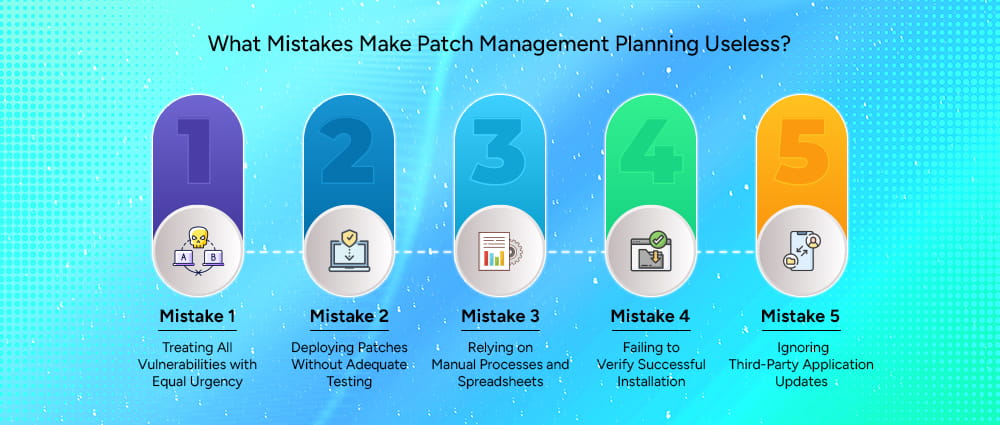
Patch fatigue is real. When every vulnerability is treated as equally urgent, teams become overwhelmed and nothing gets the attention it deserves. Risk-based prioritization is not optional, it is the only way to make rational resource allocation decisions.
The pressure to patch quickly after a high-profile disclosure is understandable, but pushing untested patches to production introduces operational risk that can be just as damaging as the vulnerability it addresses. Every organization needs a testing process appropriate to its risk tolerance, even if that process is abbreviated for critical emergencies.
Tracking patch status in spreadsheets, emailing reminders to system owners, and manually verifying deployments does not scale. Manual processes are slow, error-prone, and invisible to management. Investing in purpose-built patch management tooling is not a luxury for large enterprises. It is a basic operational requirement for any organization managing more than a handful of systems.
Deploying a patch is not the same as confirming a patch was successfully installed. Patches fail silently all the time due to network interruptions, reboots that never happened, or conflicting software. Without automated verification scanning, organizations can have a false sense of security about their patch posture.
Operating system patches from Microsoft, Apple, and Linux distributions get most of the attention, but third-party applications like browsers, PDF readers, office productivity software, and developer tools are frequently exploited. Adobe Acrobat, Google Chrome, Java, and similar applications need to be included in patch management scope, not managed as an afterthought.
When leadership asks why the organization should invest in patch management automation, the answer comes down to a simple comparison: what it costs to maintain a solid patching program versus what it costs when that program does not exist.
The math on patching automation is not complicated once you put real numbers on both sides of the equation. The average cost of a ransomware recovery in the US runs into the millions when you include downtime, recovery labor, forensics, legal counsel, notification costs, and potential regulatory fines. The annual cost of a mature patch management program, including tooling and staff time, is a fraction of that.
Cyber incident simulations and tabletop exercises can help make this concrete for executives and board members. Walking through what a ransomware incident would actually cost the organization in lost revenue, recovery expenses, and reputational damage provides context for patching investment decisions.
Manual patch deployment for an environment of a thousand endpoints might require 20 to 40 hours of IT staff time per patch cycle. Automated deployment can reduce that to a few hours of oversight and exception handling. Over a year with monthly patch cycles, that is hundreds of hours of IT staff time recovered and redeployed to higher-value activities.
Documenting this time savings and translating it into labor cost provides a concrete ROI figure that resonates with CFOs and budget committees. Adding the reduction in security incidents attributable to improved patch coverage strengthens the business case further.
Cyber insurance companies now closely check how well an organization manages software updates (patches). If a company regularly updates systems, keeps records, and uses proper tools to manage patches, insurers see it as lower risk. This can help them get better coverage and pay lower insurance premiums.
Some insurance providers now even ask detailed questions about patching processes, timelines, and the tools being used before offering a policy.
On the other hand, if a company does not manage patches properly or delays updates, insurers may see it as high risk. This can lead to higher premiums, limited coverage, or even rejection of claims if a security incident happens and poor patching is found to be a cause.
A good patch management strategy is not something you build once and forget. It requires ongoing attention, the right tools, clear ownership, and buy-in from both IT and business leadership. The goal is not to patch everything perfectly, because that is not realistic. The goal is to close your most dangerous gaps as fast as possible without disrupting the business in the process.
Organizations that do this well treat patching as a business risk issue, not just an IT chore. They use automation to keep up with the volume, measure their results, and make sure security and operations teams are working together instead of pulling in opposite directions.
The threat environment is only getting harder. More vulnerabilities are being disclosed every year, and attackers are exploiting them faster than ever. Unpatched systems remain the easiest target.
If you are not sure where to start, or if your current approach has gaps you cannot close on your own, Arpatech’s Governance, Risk, and Compliance (GRC) services can help. From building a patch management solutions framework personalized to your environment, to defining risk-based prioritization policies, maintenance windows, and exception processes.
Arpatech helps US organizations turn patching from a reactive scramble into a structured, defensible program. Getting compliant and staying secure does not have to be overwhelming, and you do not have to figure it out alone.
Let’s design the patch management strategy for your business.
Minor patches should generally be applied within 30 days of release. That said, here at Arpatech, the exact timing depends on what the patch fixes and how critical the affected system is.
Most organizations handle minor patches during their regular monthly maintenance window. If a minor patch addresses something actively being exploited in the wild, it gets bumped up in priority regardless of its severity rating.
The three types of patch management are:
Three numbers tell most of the story and at Arpatech, we leverage them:
Deployment success rate: Of all the patches your team pushed out, how many installed successfully on the first attempt? A high failure rate signals problems with your testing or deployment process.

Before we begin, please solve this quick math check to confirm you're human, and you'll be all set to start chatting with our AI assistant.
Stay connected with us to receive the latest information, updates, and insights from our world of innovation.
By entering your email address you will receive promotional updates.


© 2026 ARPATECH (ADVANCED RESEARCH PROJECTS & TECHNOLOGY)