One of the best languages for web developers to develop dynamic websites is PHP. Developers love to use PHP because of the cool features that it provides for the best web application development.
As a PHP programmer, your first concern should be to make a web application that is secure and avoid any inadvertence that allows security holes to creep into a Web application.
To make the PHP website more secure, a PHP developer must understand the basic types of flaws that any PHP application tends to exhibit. To understand the blunders, you must have the details about the common PHP programming mistakes that you might make and what the PHP security best practices are.
Key Takeaways:
New PHP installations use recent PHP releases; therefore, they have more secure code. But make sure your PHP application is installed on a good server with an updated PHP version, not on the php.ini file.
To get through the problem of PHP configuration, the solution is to create a page that calls phpinfo()- A function whose work is to list your php.ini variables and scan them for insecure settings.
The main thing that you have to keep in mind is that you never allow public access to this profile, as there is no compromise on the security of your website.
You have to keep in mind three settings for the configurations:
1: register_globals: The most important thing to keep in mind is to always disable it. If you are using a shared host and they don’t allow you to disable it, then it’s high time to get a new host.
2: safe_mode: Enable this setting if your application opens local files often. This setting is used to prevent unauthorized access.
3: disable_functions: This has to be set in your php.ini file only. Disable it in your PHP installation. By doing so, it can prevent harmful PHP code from being executed at runtime.
The error called Data handling errors occurs when the local system’s file data is handled incorrectly and in an insecure manner. Never ever transmit your encrypted data with HTTP. Always use HTTPS, which is more secure, to transmit secured data like credit card numbers and customer information.
To transmit sensitive data to the user’s browser, always use SSL security, or else a malicious eavesdropper on any router can easily catch the sensitive data and information out of the network.
Whenever you update your application using FTP, an insecure protocol, there is always a risk of data mishandling. Use SFTP or SCP over FTP to transmit your sensitive files to the server. That is a PHP security best practice.
Now, the most important tip is that you have to minimize the exposure to data handling flaws. This means minimizing the data and only keeping the data that you use more often. For data that you don’t use for a long time, just archive it! And store it offline.
Unvalidated input error is the most common PHP vulnerability. Input refers to the input that users provide, which should not be trusted. It can be a scam or can be malicious. Whatever user input you have, you have to validate to create secure PHP web applications.
Restrict the user’s input; if some characters or symbols should not be a part of the user input, reject the input completely or simply strip them out.
This the most important and noticeable PHP vulnerability that creates many problems with web development. Session ID contains the information of the user that is using the website, and if the attacker could hijack the ID, all the info can be seen.
To protect the user’s information, a unique Session ID is assigned to each user. Not only this, but you also have to keep track of the risks when migrating them over the internet.
Here is another tip to avoid PHP blunders:
To assign the Session ID, use the session_regenerate_id function. Use an SSL-secure connection if your site has sensitive information.
One of the PHP vulnerabilities that must be treated with special concentration is Cross-site scripting, or XSS, a subset of user validation. The blunder is that the malicious user embeds scripting commands — usually JavaScript- in the data that other users have to execute.
The solution is that you have to filter these types of tags like <script>. This will work when the content is first submitted to get reviewed.
Your PHP website has to be intelligent enough that it can easily report any error rather than showing it in the PHP web application. Make sure that the display_errors php.ini value is set to “0”; if not, then all the errors encountered during runtime will be displayed to the user’s browser. And any malicious user can easily take advantage of these errors and will take information about any entry point to the website.
The solution to avoid this is to set the error_log ini variable to “1” to catch frequent log errors. Or make your own custom error handling functions. To get further information, read the PHP manual pages on error handling and learn about the set_error_handler() function.
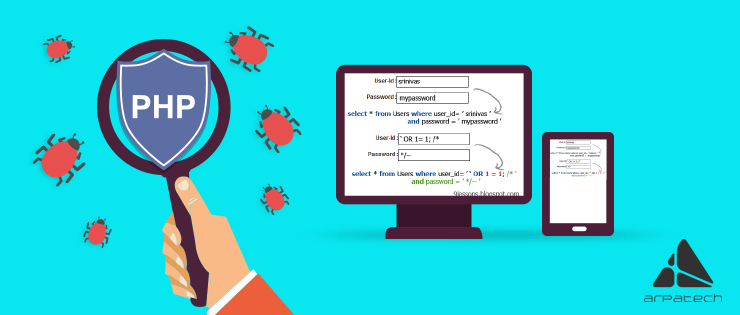
Another class of input validation flaws that affects PHP security. They affect the database query, and through this flaw, a malicious user can easily gain an entry point.
The solution is very simple: just escape all the dangerous characters that you see in the user-submitted values, such as single quotes (‘). Check the user input for the keywords “FROM”, “LIKE”, and “WHERE” in a case-insensitive fashion. Use the addslashes() function in PHP.
$username = addslashes($_POST["username"]);
$password = addslashes($_POST["password"]);
PS: It depends on your PHP configuration.
Another magical feature that PHP provides is the magic_quotes_gpc php.ini variable, and setting it to Off means it will apply addslashes to all values submitted via GET, POST, or cookies automatically.
This feature really helps newbies in PHP programming and inexperienced developers, but experienced developers always switch this feature off. However, if the software is installed on shared servers, where you can not edit the php.ini file, and this feature is on, check the status of magic_quotes_gpc using the following code.
if (get_magic_quotes_gpc()){
$_GET =array_m ap('stripslashes', $_GET);
$_POST = array_map('stripslashes', $_POST);
$_COOKIE = array_map('stripslashes', $_COOKIE);
}
As a PHP developer, securing your web application is one of the most important responsibilities you carry. The blunders outlined in this blog are more common than you might think, but with the right practices in place, they are entirely preventable. See how Arpatech built a fully secure fiat and crypto transactions platform and delivered a seamless license renewal system that transformed an entire business process.
PHP security vulnerabilities are common, but can be avoided by following proper coding practices and secure configuration methods. Strengthening input validation, session management, and database security helps protect applications from major threats. Contact Arpatech for professional and secure PHP development services. If your current site isn’t meeting expectations, let’s improve it together


Before we begin, please solve this quick math check to confirm you're human, and you'll be all set to start chatting with our AI assistant.
Stay connected with us to receive the latest information, updates, and insights from our world of innovation.
By entering your email address you will receive promotional updates.


© 2026 ARPATECH (ADVANCED RESEARCH PROJECTS & TECHNOLOGY)